+91-98558-85133
 +1(702)760-3099

Key Takeways
- AI application development goes beyond building models and requires a structured, end-to-end process from idea to deployment.
- Defining the right business problem is critical to avoid wasted budgets and ensure AI delivers real value.
- High-quality, relevant data and the right tech stack are essential for training accurate and scalable AI models.
- AI models are designed, trained, fine-tuned, and tested using techniques like supervised, unsupervised, and reinforcement learning.
- Successful AI apps require seamless integration, continuous testing, deployment, monitoring, and regular retraining to prevent model drift.
- Trigma helps businesses accelerate AI development with ready-to-deploy solutions like Tracesales AI, TellDoc AI, Trove AI, and Truly Card AI.
Have you ever wondered why some AI products scale while others stall after launch?
Building an AI app isn't just about models; it's about executing the right process from idea to deployment. For founders, CTOs, and product leaders, one wrong decision can mean wasted budgets or delayed go-to-market.
That's why understanding how AI is delivered matters as much as what you build.
In this article, we break down our end-to-end AI app development process so you know exactly what to expect when partnering with a dedicated development team.
The 8-Step Process for Developing an AI Application from Scratch
Artificial Intelligence has become the backbone of software development, making every phase of delivery process easier from:
- writing and reviewing code,
- automating coding tasks,
- finding bugs before they happen, and
- speeding up time to market.
That's what Thomas Dohmke, CEO of GitHub, has highlighted while discussing AI-assisted development. He explained that AI-powered tools help automate routine coding work, allowing developers to stay focused on solving complex problems and build better software.
This means that while AI can speed up your workflows through automation, it can become a big HEADACHE if you don't know what you want to build.
Whether you're building an AI product on your own or evaluating vendors to outsource app development, here are 8 actionable steps you can follow to build an AI app.
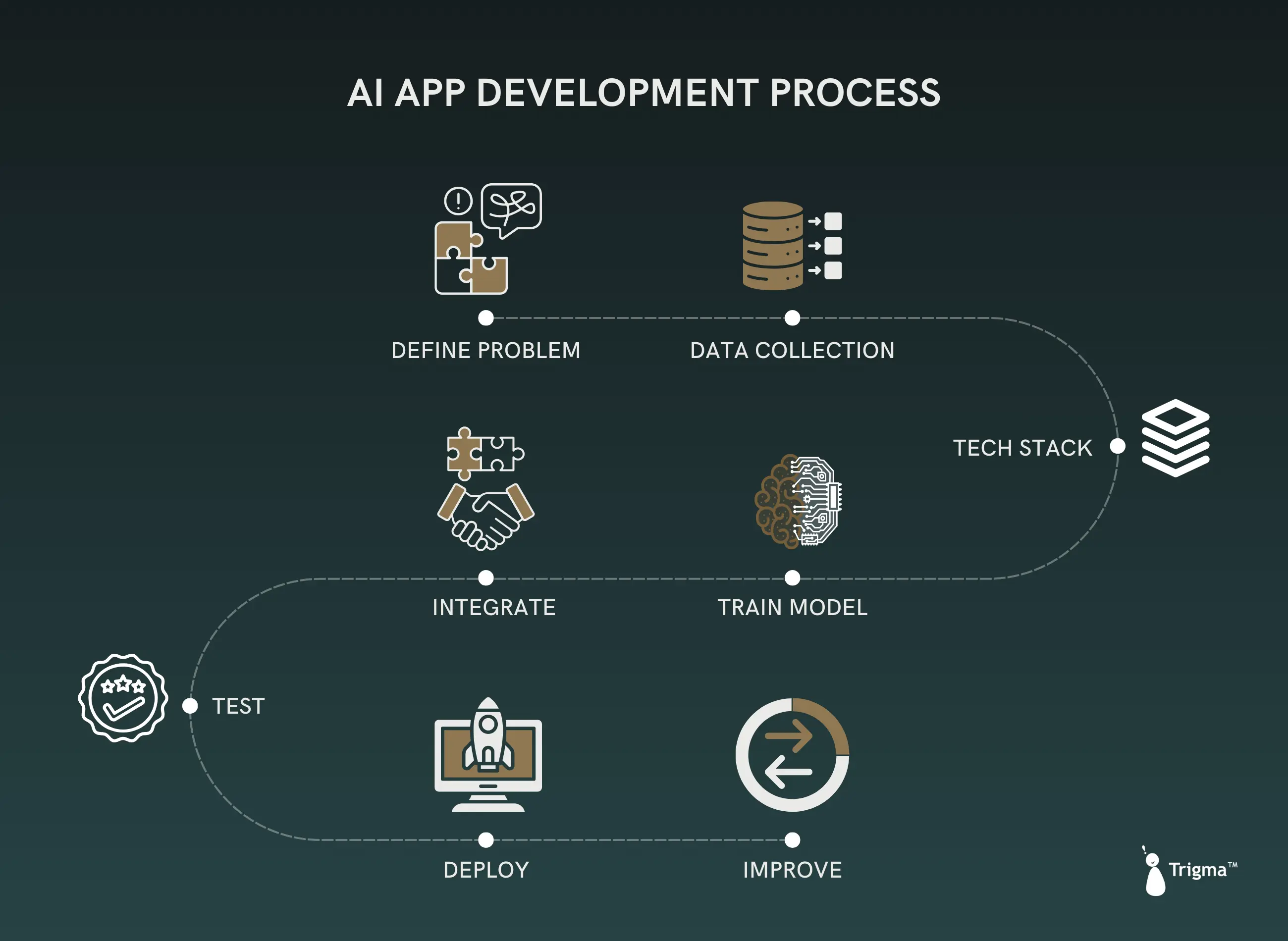
1. Define the Business Problem First
Before developing an AI-based software solution, you need to define the core problem your business faces, such as whether you want to:
- automate repetitive workflows,
- increase personalization, or
- enable real-time analytics.
This involves spending serious time outlining the scope, potential impact, and desired outcomes of building an AI application.
Think about how this AI solution can add value to your users' lives or benefit your organization internally.
Skipping this problem definition phase means you're going to compound the risks later in the software development lifecycle.
No problem = No product
For example, a logistics company may want to reduce route optimization time, while a financial institution may want to predict loan default rates based on customer data. You need clarity on problems like where the most time is spent on manual tasks and that's where AI can shine.
2. Data Collection
The next step in AI application development is not just about generating chunks of output;it's about asking:
- what datasets the AI model is trained on,
- which data the AI uses to generate output, and
- whether you're using publicly available data.
If you train AI on the wrong data, even a sophisticated model will produce inaccurate outputs. That’s why the data you use to train your AI model should be clean, relevant, and well-structured.
It can be done by removing duplicates, labeling datasets correctly, and handling missing values.
For natural language processing tasks, Common Crawl is commonly used; it was even used for OpenAI's GPT-3 model.
Another way to access high-quality datasets is through open dataset platforms such as Kaggle and AWS Data Exchange.
This eliminates the need for engineering teams to collect data from scratch, saving significant time and effort.
3. Choosing the Right Tech Stack
Here comes the part of choosing the right technology tools for training your AI models that align with your business vision and can be integrated well with existing infrastructure.
For example, Python is the go-to programming language for AI development because of the rich ecosystem and strong community support it provides.
Here are some popular frameworks and tech stacks that can be used for building AI and Gen AI applications:
Component AI App
Programming Language Python, R, JavaScript
AI Frameworks TensorFlow, PyTorch, Scikit-learn, Hugging Face Transformers
Development Tools Jupyter Notebook, Visual Studio Code
Data Processing Pandas, NumPy, Dask
Machine Learning Library TensorFlow, PyTorch, Keras, Hugging Face Transformers, MXNet, Chainer
APIs Flask, FastAPI, Gradio
Data Storage PostgreSQL, MongoDB, Elasticsearch, Vector DB
Cloud Platforms AWS, Azure, Google Cloud
Version Control Git, GitHub
Containerization Docker, Kubernetes
Deployment Tools Heroku, AWS Elastic Beanstalk, Azure App Service
Monitoring and Logging Prometheus, Grafana, ELK Stack
Continuous Integration/Deployment Jenkins, GitLab CI, CircleCI
Automated Testing Selenium, PyTest, Locust (for load testing)
4. Designing, Training, and Fine-Tuning the AI Model
Training is just a part of the product development process. While monitoring the performance of an AI model is another part of the story.
Here's how you can proceed:
(a) Choose the right training technique
Type of Training When is it used?
Supervised learning You have labeled datasets and the outcome is also known.
It's extensively used for apps such as facial recognition or software used in autonomous driving vehicles.
Unsupervised learning You don't have input and output datasets.
You train the model to recognize patterns.
Reinforcement learning Making AI agents and models better by reinforcing them when they do good things and punishing them when they do bad things.
For instance, if you're creating an LLM (OpenAI model like GPT-5), you're training the model, creating the environment by setting things such as web search and remote code execution, giving it tasks it's allowed to do, and setting the reward mechanism based on that.
(b) Select the model architecture
- Convolutional neural networks for image and video analysis
- Recurrent neural networks for speech recognition and translation tasks
- Generative Adversarial Networks for performing specialized tasks such as image generation and video enhancement
(c) Prepare the data for training
Split data into training datasets (such as 70/15/15 datasets)
(d) Training and optimizing the model
- Feeding data: Train the model through multiple iterations
- Hyperparameter tuning: Adjust the model parameters based on improvements in the model's performance
- Cross-validation: Split the data multiple times, training and testing the model on different parts each time. This gives a true picture of how the model will perform on unseen data.
5. Integration of Model into the App
Once the model is trained and validated, the next step is integrating models into your app ecosystem.
Here, you need to decide whether to integrate the AI model into the frontend or backend part of the application.
Frontend integration is required for enhancing user experience, while backend integration is well-suited for performing complex tasks such as speech recognition.
For handling backend requests, this involves setting up the model and containerizing it using Docker or TensorFlow Serving.
Note: For building AI-powered mobile apps, optimizing model performance is crucial for low latency.
If the app takes too long to provide recommendations, users are likely to abandon it, especially when running the model on the cloud or on-device.
Want to build a custom AI application for your business?
Share your project idea with us, and our AI experts will help you assess feasibility, define the right approach, and build a scalable, production-ready AI solution.
6. Testing the AI Model
Training models should not be treated as a one-and-done task.
Every time the data changes even slightly, you need to revalidate and test the model so that it's relevant to the current scenario.
These models are imperfect when starting out, but to keep them up-to-date, they need regular retraining to avoid model drift as performance declines when data patterns change.
Here are three methods you can use to test the AI app:
Type of Testing What it Mean
Unit testing Testing smaller, individual parts of the application
Integration testing Testing how the AI model interacts with other components
User acceptance testing Testing whether the app meets user expectations
7. Deploy the Model
Post-launch, you need to refine the model performance and retrain it so that it can perform well in the current environment.
In this stage, user feedback will be collected to see whether the model meets user preferences and solves their pain points.
If not, an iterative development approach will be used to improve its performance based on user feedback and engagement metrics.
8. Improve the Model Performance Based on User Feedback
After testing is conducted, you need to choose the platform where you will deploy it such as Android/iOS or Google Cloud Platform.
The deployed applications should be continuously monitored to optimize app performance and updated, as updates roll out to minimize downtime and enhance user experience.
How Can Trigma Help You in the AI Software Development Process?
As an AI app development company, we've worked with Fortune 500 companies, helping them through our intelligent automation solutions such as Generative AI, Agentic AI etc.
Whether you're looking to build an AI model from scratch or integrate AI solutions into your existing app, we can help you take the first step in your digital transformation journey.
Here are some examples of ready-to-deploy AI solutions for businesses of all sizes:
Trigma AI Offerings Description
Tracesales AI An autonomous sales agent for businesses who want to sell faster and smarter.
TellDoc AI An AI-powered telemedicine platform that is fully customizable to your healthcare workflows, providing digital-first healthcare experiences to patients.
Trove AI An AI-driven venue booking platform that provides personalized venue booking suggestions to users based on their real-time preferences.
Trulycard AI A ready-to-deploy custom printing Gen AI solution for agency, ecommerce, and print businesses.
Need help developing a similar AI solution or an agent to speed up your business workflows?
Trusted by startups, enterprises, and Fortune 500 companies for AI-driven solutions.
FAQs
How much time and cost is required for building an AI application?
The timeline for developing an AI-powered app can take around 2-4 months and range from $30,000-$50,000.
Building a medium to complex version may require 4-9 months or more and can cost $120,000 or higher.
The cost and timeline differ depending on various factors such as project complexity, chosen tech stack, size and location of the development team, their expertise, and the features and functionalities you need.
Tell me the step-by-step process of integrating AI features into an app?
The process of integrating AI into any app whether Android or iOS starts with deploying intelligent workflows such as machine learning algorithms:
- Decide what problem AI will solve (such as recommendations or image recognition)
- Select the right AI models (can be pre-trained or custom-built per your project needs)
- Collect relevant data for your use case
- Choose the tech stack for AI integration (such as TensorFlow, PyTorch library)
- Connect the AI with the backend part of app architecture
- Measure the performance of your AI model