performance icon
Top IT Services Company 2025 Top Software Developers 2025 Top Generative AI Company 2025 G2 High Performer Winter 2025 G2 Leader Winter 2025 AI Deployment Company 2024 Top Software Development Company in USA for 2024 Top ReactJs Company in USA for 2024
trigma-logo

Developing an E-Learning App Like Skillshare

The world of learning has gone digital. Education has shifted from traditional classrooms to flexible, online platforms, offering learners the freedom to access knowledge anytime, anywhere. Apps like Skillshare have transformed the way learners acquire new skills, making learning more accessible than ever. These platforms empower individuals to learn at their own pace, from any location, with expert instructors guiding them along the way.

The online learning platforms market is growing at a very fast pace. According to Statista, The online learning platforms market is projected to grow significantly, with a compound annual growth rate (CAGR) of 5.26% from 2024 to 2029. By 2029, the market volume is expected to reach $75.52 billion, with approximately 1 billion users globally.

If you’ve ever thought about building an e-learning app, now is the perfect time to tap into the rapidly growing education industry. But where do you start? What features will set your app apart, and cost to build an e-learning app? This blog will answer all those questions and kickstart your app development process.

Must-Have Features for Building an E-Learning App Like Skillshare

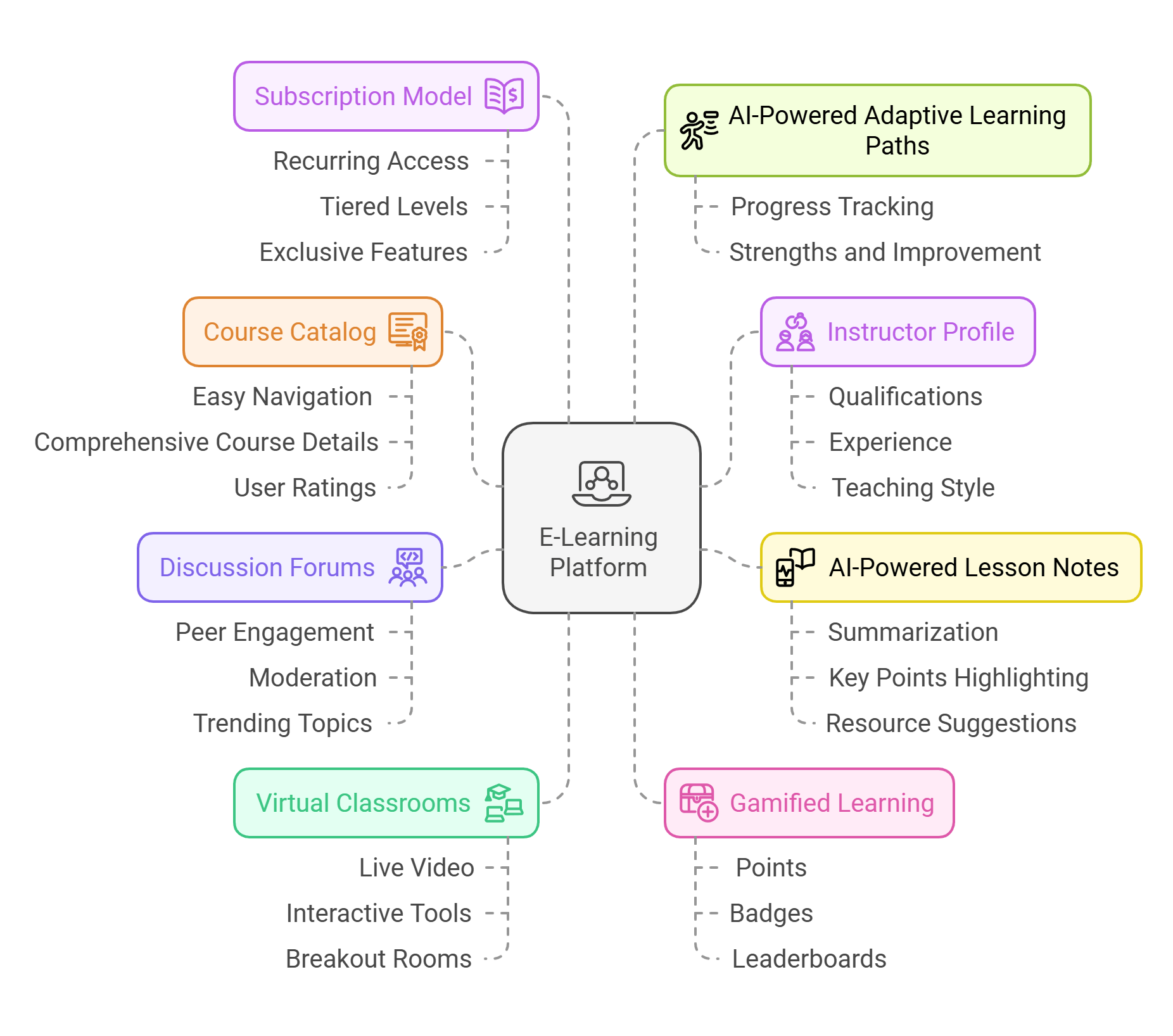
Are you planning to undertake E-learning app development like Skillshare but unsure about which features can enhance user experience and make your app stand out? Below are some must-have features you should integrate into your platform:
E-Learning-app

Course Catalog

A well-organized course catalog is essential for an e-learning platform. It should offer easy navigation, comprehensive course details, clear categories, and user ratings, allowing learners to easily explore and select courses that best match their learning goals.

Instructor Profile

An instructor profile feature enhances trust and engagement. It should showcase the instructor’s qualifications, experience, teaching style, and ratings, giving learners confidence in their expertise. This personalized profile helps users connect with instructors and choose courses wisely.

AI-Powered Lesson Notes

AI-driven lesson notes automatically summarize content, highlight key points, and suggest personalized resources based on learning patterns. This feature helps students retain information more effectively, organizes notes for easy review, and offers personalized study recommendations.

Discussion Forums and Groups

The interactive discussion forums and groups allow learners to engage with peers, ask questions, and exchange ideas. AI can enhance these features by moderating conversations, highlighting trending topics, and recommending relevant discussions, fostering a collaborative and supportive learning community.

Virtual Classrooms

A Virtual Classroom in e-learning solution fosters real-time discussions, creating a collaborative and supportive environment like traditional classrooms. With live video, interactive tools, breakout rooms, resource sharing, and recordings, it ensures flexible, engaging, and accessible learning for all.

AI-Powered Adaptive Learning Paths

AI-driven adaptive learning paths adjust content based on learners' progress, strengths, and areas for improvement. This personalized approach ensures users receive customized lessons, optimizing their learning experience and helping them achieve goals more effectively.

Gamified Learning

Incorporating gamification elements like points, badges, and leaderboards enhances engagement. It turns learning into a fun challenge, motivating students to complete tasks, track progress, and compete, boosting retention and continued learning.

Subscription Model

A subscription model provides users with recurring access to premium content for a fixed fee. It can be tiered, offering various levels of access and exclusive features. This model ensures consistent revenue, encourages long-term user commitment, and provides flexibility in content consumption.

Cost of Developing e-learning apps like Skillshare

After knowing about the features that can make the app user-friendly and unique, you must be wondering about its development cost. The cost of developing an e-learning app is not fixed it depends upon various factors such as features, complexity, tech stack used and much more. However, we can give you a rough idea of the development cost in the table:

App Type Cost Estimate
Simple App with basic features $10-$20k
Moderate App with interactive features $30-$40k
Complex app with advanced features $50-$100k

This is just a rough estimate of the e-learning solution development cost. The final cost will depend on the specific features, complexity, and platform requirements you choose for your app.

Factors Affecting E-Learning Apps Like Skillshare Development Cost

The cost of Online learning platform development depends on various factors that directly or indirectly influence the overall development expenses. Here are the key factors:

App Features And Functionalities

The features and functionalities of an e-learning app significantly influence development costs. Advanced features like virtual classrooms, gamification, AI-based personalization, and discussion forums add complexity, requiring more time, expertise, and resources, ultimately increasing the overall development expense.

Tech Stack

The tech stack significantly influences e-learning solution development costs. Front-end technologies like React or Angular ensure a responsive UI, while back-end frameworks like Node.js or Django handle server-side logic. Databases like MySQL or MongoDB manage data. Integrating advanced features such as AI and real-time communication tools adds complexity, increasing costs.

Platform Choice

The platform choice affects e-learning solution development costs. Developing for a single platform (web, iOS, or Android) is more affordable, while cross-platform solutions like React Native or Flutter reduce costs with a unified codebase. Native development for separate platforms increases expenses due to multiple codebases and specialized teams.

Third-Party Integrations

Integrating third-party services like payment gateways, video conferencing tools, or external APIs adds complexity and cost to e-learning platform development. These integrations require extra development time, testing, and maintenance to ensure compatibility, security, and smooth functionality, potentially increasing both initial costs and long-term expenses.

Security and Compliance

Security and compliance impact e-learning platform development costs by requiring additional measures such as encryption, secure logins, and data protection. Compliance with regulations like GDPR and HIPAA involves legal expertise, coding, and ongoing maintenance, increasing both development and long-term costs.

Conclusion

The cost estimates for developing an e-learning platform outlined above will help you plan and manage your app development process efficiently, ensuring you avoid unexpected hurdles and make informed decisions regarding features, tech stack, integrations, and security while staying within your budget. To make the process more streamlined and efficient, it's essential to choose an experienced EdTech app development team. Their expertise will help ensure the platform is built with the right technology, functionality, and compliance, saving time and costs while delivering a high-quality, scalable solution.

Willing to make your business shine in the dynamic education industry?

Get a feature-rich and innovative online learning app designed by our development experts at Trigma. Join the edtech revolution and offer a seamless, engaging learning experience to your users.


React Native Vs Flutter: Which App Framework To Choose?

When it comes to cross-platform mobile app development, React Native and Flutter are top contenders. React Native, with its mature ecosystem and large community, offers stability and flexibility, making it a trusted choice for developers. Flutter excels with its stunning UI toolkit, enabling developers to create smooth, customizable apps that perform seamlessly across iOS and Android. The best framework for your project depends on your specific goals, team expertise, and the user experience you want to create.

According to a 2023 Statista survey, Flutter and React Native are two of the most popular frameworks used by developers for cross-platform app development.

In this blog, we’ll compare Flutter and React Native, highlighting their unique features to help you choose the ideal framework that aligns with your project goals.

React Native Overview

React Native, developed by Facebook, allows developers to build high-performance mobile apps for iOS and Android using a single JavaScript codebase. It combines the efficiency of cross-platform development with native-like performance, enabling rapid app creation without sacrificing quality. With access to a vast ecosystem and real-time updates through hot reloading, React Native streamlines mobile development for both developers and businesses.

Unique Characteristics Of React Native

React native is a widely used framework for cross-platform app development. Given below are some unique features that make it unique and the best choice:

1. Speed Up Development

One key advantage of React Native is faster page loading compared to standard JavaScript, improving user retention and SEO. Faster loading leads to better search rankings and enhanced web app performance.

2. Modular and Intuitive

React Native’s intuitive code structure enables developers to easily collaborate, speeding up updates and testing. This leads to significant time savings, making it a valuable advantage for both clients and CFOs.

3. Strong Performance for Mobile Environments

React Native is optimized for mobile performance by leveraging the GPU, unlike traditional CPU-driven native platforms. It outperforms older hybrid technologies, providing faster and more efficient cross-platform app development.

Popular Apps Built Using Flutter

Google Ads, Alibaba, and Philips Hue are examples of popular apps built with Flutter, demonstrating its ability to create smooth, fast, and visually appealing mobile experiences.

Flutter Overview

Imagine building beautiful, high-performance apps for mobile, web, and desktop—all from a single codebase. That’s Flutter! Developed by Google, this open-source powerhouse is a game-changer in app development, offering expressive designs, lightning-fast performance, and unparalleled flexibility. Whether you’re crafting sleek UIs or aiming for seamless cross-platform compatibility, Flutter is your key to building apps that engage users and leave a lasting impression.

Unique Characteristics Of Flutter

Flutter’s growing popularity in app development is no accident. Its unique features set it apart, empowering developers to create engaging, high-quality applications. Here’s what makes Flutter truly distinctive:

1. Hot Reload

Hot Reload instantly displays code changes in the app’s UI, speeding up design adjustments and enabling quick error fixes, saving time and resources in the development process.

2. Cross-platform Development

Flutter lets developers use a single codebase for multiple platforms, making app maintenance easier by sharing both functionality and UI.

3. Native Like Performance

Unlike other frameworks, Flutter compiles directly to machine code, bypassing the need for a bridge. This results in smoother animations and more responsive apps.

4. Rich Animations and Graphics

Flutter’s powerful Skia engine enables stunning animations and high-quality graphics, allowing developers to create dynamic, visually engaging user experiences with smooth transitions and intricate designs

Popular Apps Built Using Flutter

Google Ads, Alibaba, and Philips Hue are examples of popular apps built with Flutter, demonstrating its ability to create smooth, fast, and visually appealing mobile experiences.

Difference Between Flutter & React Native

Aspect React Native Flutter
Framework Designed By Facebook Designed By Google
Language JavaScript (with JSX) Dart
User Interface Component-based Widget-based
Platform Support Supports iOS, Android, Web Supports iOS, Android, Web, macOS, Linux, Windows.
Native Modules Integration Allows integration with native modules through bridges Requires platform-specific channels for native integrations
Native Modules Enables native integration via bridges. Platform channels enable native communication.

When to Go for React Native

React Native is an excellent choice in various situations. Here are some scenarios where it excels:

When You Are Planning To Build A Large Scale Application

React Native is a great option for large-scale applications with complex workflows and robust architecture. Its flexibility, along with mature tools like Redux and context APIs for state management, makes it well-suited for handling larger codebases efficiently.

When You Need a Large Ecosystem Of Libraries And Plugins

The excellent framework benefits from a mature ecosystem, offering a wide range of third-party libraries and plugins. This makes it easy to add features like maps, push notifications, and payments without writing custom code.

Familiarity With Javascript

If you're comfortable working with JavaScript, React Native is the perfect choice. Since it's based on JavaScript, you can quickly onboard and develop the app without learning a new language.

When To Go For Flutter

Flutter is an excellent choice for certain types of projects. Here are some situations where Flutter would be the best option:

When You Require Exceptional Performance

If your app requires smooth animations and high performance, Flutter is a great choice. Since Flutter compiles directly to native ARM code and controls every pixel on the screen, it provides better performance compared to frameworks that rely on JavaScript bridges.

When your project needs custom UI Design

Flutter is perfect for building highly customized and visually rich UIs. It offers a broad collection of pre-designed widgets and extensive customization options, enabling developers to craft unique and consistent user interfaces across both iOS and Android platforms.

When You Need Custom Animations And Graphics

Flutter is an excellent choice for apps that require complex animations or custom transitions. It offers fine-grained control over rendering and animations, providing greater flexibility compared to other frameworks. This allows developers to create smooth, dynamic visual experiences.

Wrapping Up

While both React Native and Flutter are excellent app development frameworks for cross-platform development, each brings unique strengths to the table for building high-performance, scalable apps. They serve different purposes. React Native is more appropriate for large-scale projects or teams that are already familiar with JavaScript, whereas Flutter is better for apps with rich visuals and performance. The decision ultimately comes down to the objectives, size, and development priorities of your app.

Bring Your App Idea to Life – Let's Begin!

Do you have a unique mobile app idea in mind? Let Trigma bring it to life with seamless, high-performance apps designed to work effortlessly across mobile, web, and desktop platforms.

FAQs

Can Flutter and React Native be used for web and desktop apps?

Yes, both Flutter and React Native can be used for web and desktop apps. Flutter offers better native support for both, while React Native requires community tools for desktop and web.

Which framework is better for my startup: React Native or Flutter?

For startups, React Native offers faster development and a large community with extensive libraries, while Flutter provides better performance and more design flexibility. The choice depends on your app's specific needs.

What are the main differences in UI design flexibility between React Native and Flutter?

Flutter offers greater UI flexibility with custom widgets and its rendering engine, allowing more control over design. React Native uses native components, providing fewer design customizations but easier integration with existing platforms.

Top 10 Trends in Artificial Intelligence to Watch This Year

Artificial intelligence has taken a new turn in the technology-oriented world. Years of development have created various sophisticated models that have laid the foundation for more advanced innovations in AI.

Businesses are realizing how AI is changing operations and creating more interactive ways to improve customer interaction. To stand out in the market companies are leveraging AI tools and marking a competitive place among others.

You will not be amazed to explore the numbers within this industry. The estimated market size of the artificial intelligence market is projected to reach $184 billion in 2024 and $826.70 billion by 2030. According to GoodFirms research, 75% of businesses are using AI to automate their business processes.

As AI adoption is increasing, budget planning for AI development is becoming a crucial factor for business. A well-structured budget ensures informed decision-making and brings efficiency to operations. If you’re thinking about how AI development aligns with your budget planning? Check out this blog on effective budget planning for AI in 2025.

This trend depicts the need to deploy AI in operations so that companies can place themselves differently in the market.

In this blog, we will discuss top artificial intelligence trends that can give businesses new heights in their operations.

AI trends to watch this year

Here are the top artificial intelligence trends that will stand out in this competitive world.

Multimodal AI

1. Multimodal AI

Multimodal AI is the most trending innovation in the AI world. It is an advanced form of AI that can process multiple levels of data generated in the form of music, audio, and images. This approach creates a more holistic and human-like cognitive experience. It allows AI to connect information through various formats and enables a richer understanding of the context. Multimodal AI allows for more diverse data inputs and this expands the information available for training. For example, Ingesting data by video camera for holistic learning.

Smaller models

2. Smaller models

Larger AI models just jump out with excessive AI buzz, but they’re not without drawbacks. Even training a single GPT-3 model requires the yearly electricity of a household. But smaller models are far less resource-intensive. Smaller AI models are compact versions of large models, designed to deliver high performance with fewer resources. These models aim to be more efficient in terms of power, memory, and energy as compared to large models. Even the ongoing innovations in LLM are focused on yielding greater output with fewer parameters.

Shadow AI

3. Shadow AI

Shadow AI refers to AI tools and techniques that are used within an organization without IT approval or oversight. These are implemented by teams independently to meet specific needs neglecting all security concerns. According to E&Y, 90% of respondents said they use AI at work. Well, this is the growing AI trend that can help companies to look more agile and innovative. But sometimes it has been observed that without corporate policies this can lead to considerations like privacy and security. So companies must undertake necessary policies for this.

Ethical AI

4. Ethical AI

As our lives expand, the use of AI technology is paramount. Every person needs transparency and reliability to ensure AI remains a good tool in the coming years. Ethical AI refers to the development and deployment of AI tools in ways that prioritize transparency, accountability, and respect for individual rights. This approach is essential for long-term growth and thus leads to a better image of companies in the market.

Sustainable artificial intelligence

5. Sustainable artificial intelligence

Sustainable AI refers to deploying AI technologies in a way that minimizes environmental impact and promotes energy efficiency in aligning with long-term environmental goals. However, AI will play a pivotal role in optimizing resource usage across various industries. Designing AI models that will use less power can prove to optimize training models and make more efficient use of resources. The organizations that will deploy AI models responsibly can create a sustainable future for tech.

Quantum AI

6. Quantum AI

This technology is created to revolutionize AI by enabling faster and more complex solutions. Quantum AI combines quantum computing and artificial intelligence to solve complex problems that are beyond the reach of computers. The tech has capabilities to speed up computations and enables major development in machine learning, optimization, and data analysis. It is majorly successful in tasks like drug discovery, supply chain, and financial modeling. Right deployment can bring effective and long-term solutions.

AI legislation & regulations

7. AI legislation & regulations

Increasing regulations will shape AI in its development and deployment. The regulations will ensure the ethical, safe, and responsible use of AI technology. AI regulations aim to protect human rights, promote fair treatment, and ensure the benefit of society as a whole. More the AI technology is integrated into various sectors, more will be the need for effective laws and guidelines. This is the growing trend in AI as governments also recognize the potential effects that AI can have.

Retrieval Augmented Generation (RAG)

8. Retrieval-Augmented Generation (RAG)

RAG is a growing trend because it significantly enhances AI's ability to understand, generate, and apply information in more practical ways. It allows models to access external databases or documents to retrieve relevant information. RAG models can be used to answer queries by retrieving relevant information and enhancing customer efficiency. This is the most effective tool for achieving unparalleled accuracy, relevance, and real-time knowledge. With RAG companies can thrive in the business world and create effective solutions.

Generative video

9. Generative video

Generative video includes the use of AI and machine learning techniques to create, enhance, or modify the video content automatically. The generative video uses algorithms and models to generate new videos or manipulate the existing ones through effective graphics. This can be used in marketing, entertainment, and social media tasks where it can effectively lower the cost and time. The potential of AI-based video can be immense and it can change the way we interact with media.

Autonomous AI agents

10. Autonomous AI agents

The artificial intelligence system is capable of performing tasks or decisions effectively without human intervention. Autonomous AI agents are capable of modifying behavior based on feedback and changing conditions making it more versatile. These are changing the way how industries perform their operations, ensuring more efficiency in the work. The future of AI agents is promising as they are changing how work is performed in organizations.

Heading Towards Future with AI Trends

In this discussion, we have explored the latest AI trends and their applications in various industries. As AI tools are emerging we are experiencing a new era in the technology world.
With major breakouts in AI through Quantum AI, Multimodal, or AI agents, the world is experiencing a new wave of innovations and advancement.

Ultimately it is impossible to imagine the impact of AI in the coming years. The Future of AI is promising in such a way that it can deliver the best solutions and transform the world with standout innovations.

In this evolving world it is important to stay ahead in the AI journey. As a competitive player in the market, you must leverage AI in your operations. To support your journey, Trigma stands as your AI supporter. We provide you with trustable and effective solutions for all your comprehensive problems. Being a leading AI development company, we have been delivering effective and AI-oriented solutions for the last 15 years.

Partner with Trigma to stay ahead in your AI journey.

Transform Your
Business with AI

Step into the future with AI technologies built to simplify workflows, maximize productivity, and keep you ahead in your industry.

UX vs UI Design: Your 2024-25 Guide to Better Design

2025 is about to start, and the seamless user experience for digital products is increasing day by day. Not only in the digital era but user experience is always recommended in other fields like physical products, interior designs, and things we use in our day-to-day life. Although UX and UI are parts of the design process, still they are putting their efforts independently to become a part of something greater.

Let’s dive into the journey where we will know why UX/UI Design is inseparable and the most important component of creating an intuitive, seamless, and user-centric digital experience. Let's talk about it.

What is UX Design?

The term UX stands for User Experience, and UX design is about creating an intuitive, seamless, user-centric design experience and how users interact with it. In the last 10 years, people have understood why they need a good UX for physical and digital products or services.

The UX design process involves identifying the user requirements and their pain points, thus providing the best possible solution to them. UX is not a one-time process; it’s a never-ending or continuous process.

UX Process

To create standout designs, here are the key steps that a designer can follow to get the best results.

1. User Research and Strategies

Knowing your users and their pain points can be solved through User Research and Strategies. If possible, go outside and talk to people who use similar products and services. Ask them about what's good and bad in the product; that will help you in making a better product.

2. Information Architecture

After user research, it's time to create an Information Architecture (IA). This simply means placing your content, sections, and CTAs in the right place. Placing things in the right place can help your user navigate through the page easily and generate leads.

3. User Personas and User Interviews

Creating user personas can be a great help to understand your user’s daily lifestyle and habits. User interviews play a great role in crafting an intuitive and seamless user experience.

4. User Flows

The next step is creating a user flow for the product. User flow can be achieved through flow charts and diagrams. Basically, we define the user’s decisions, actions, and steps from start to finish. This is also helpful for cross-functional teams as well.

5. Wireframing and Prototyping

After knowing the product's user flow, your next task is to create wireframing, i.e., design the basic structure of the product before adding visual content or graphics. Based on this layout, develop a prototype or the first draft of your product describing your product idea and functionality.

6. Usability Testing

After creating the first draft the next step is to perform usability testing. This is an amazing way to test your product before launch. You can share the prototype link with your friends and colleagues to get their feedback and suggestions. If possible, you can go out and ask people for their feedback and suggestions.

7. Iteration

As the saying goes, UX is a never-ending process. This is where iteration comes. After the first launch, get user feedback, refine the designs and functionality, make it more simple, and test it again and again. It helps in keeping the product up-to-date so the new users will adapt it very quickly and easily.

What is UI Design?

UI Design stands for User Interface design which simply means the way we look at the design. UI design is an inseparable part of the product. We need to focus on both UX and UI Design to create a successful product. UI design includes colors, typography and all the elements that will be used in the product.

Various UI Designs

Here is the key list of various UI designs that are helpful for all designers.

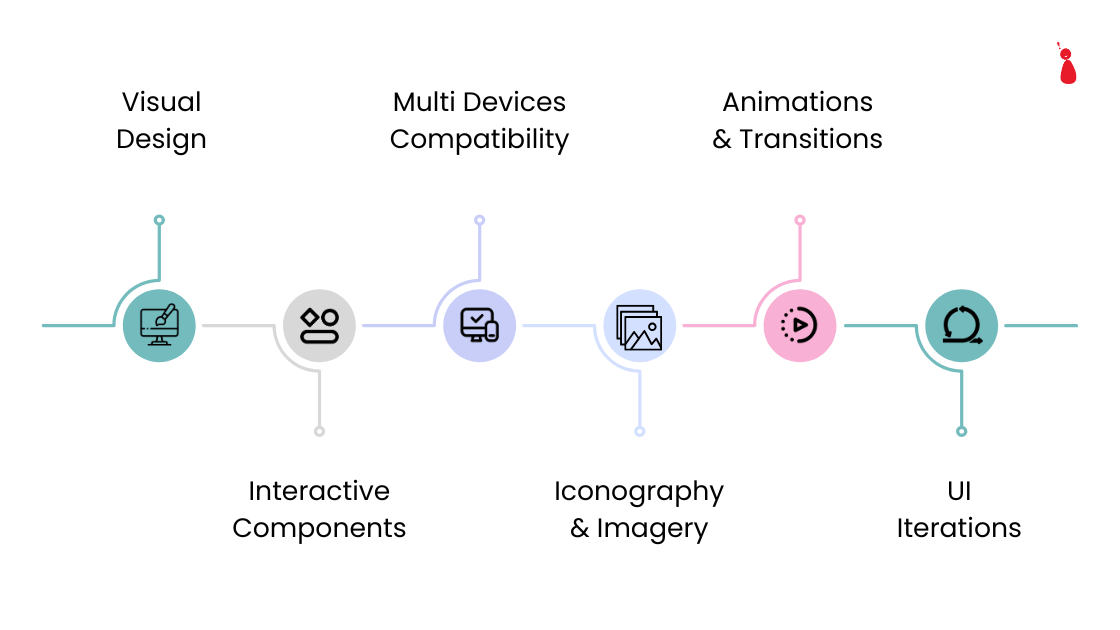
UI Design

1. Visual Design

Visual Design plays a key role in UI Design. It ensures that the UI design is aligned with the brand and follows the branding guidelines.

2. Interactive Components

While designing the UI it is very important to design the interactive components. For example: Buttons, links, form controls, shapes, etc.

3. Multi Devices Compatibility

Now everyone is moving to mobile-first design. So, it is very important for a brand to have multi-device compatibility for their products. Users should not struggle on different devices while using the product.

4. Iconography And Imagery

Understand the design concept visually where not much explanation is needed. This is where iconography and images become very handy and helpful. Using suitable icons and self-explanatory images in UI design is like God giving help.

5. Animations and Transitions

It doesn't matter if you design an eye-catching concept. With a lack of animations and transitions it still cannot count as a masterpiece. Animations and Transitions can be subjective but the majority of users love to see it on the website and apps.

6. UI Iterations

Like UX design, UI Design also needs iterations from time to time. Every 2-3 years, UI Designs need to be updated as per the current design standards. It can be colors, themes, Typography, Components, and many more.

UX/UI Design: A journey of togetherness

As we know, UX and UI Design are distinctive parts, but neither of them is worthless without the other. They need to blend in the same bowl to create a visually appealing and seamless user experience. A well-designed user interface can fail due to a lack of user experience, and good UX can also fall flat due to the lack of a visually appealing UI Design. So, UX guides users with the functional process, while UI makes the journey smooth and easy.

But here the question arises, do we really need both UX and UI?

If we're talking about a successful product, the answer is “YES.” We need both to create an intuitive, seamless, and visually appealing product. UX ensures that we’re creating the product as per user needs and providing solutions to their major problems. On the other hand, UI ensures that the user’s journey is delightful and engaging. Investing in UX and UI Design can help the brand meet its user needs and solve problems by creating a successful product.

For more assistance, feel free to reach out to Trigma or book a consultation call with our experts!

We provide excellent and personalized solutions for all your design-related queries.

Top Chatbot Development Frameworks for Web Apps

Excellent customer service is an integral element of every business. In this competitive world, every business is seeking the best way to satisfy its customers. There are many ways businesses have built better customer relationships, but what stands out the most are chatbots.

Chatbots are everywhere, whether in the real or virtual world. Every business is using chatbots for excellent customer service support. Businesses receive tons of queries every day, and it becomes a time-consuming task for humans to handle those queries. So chatbots are used to streamline customer relationships and make the process more faster.

Working on chatbots from scratch is not easy, yet multiple frameworks can help you build a responsive chatbot. Today, every website is embedded with chatbots, and that is changing our customer relationships.

In this blog, we will discuss the top development frameworks that can help you build responsive chatbots for your business.

Best Chatbot Development Frameworks

Here are the top chatbot development frameworks for all business sizes.

1. Tidio

A user-friendly chatbot designed to help businesses deliver fast, efficient customer support without the need for complex coding. Tidio offers quick and flexible solutions for all small and medium-sized businesses. It allows businesses to interact with customers across various channels from a single dashboard. Its seamless integration makes it ideal for online businesses that want an AI chatbot for their business.

Tidio

Features

Offers live chatbot and AI integration
Customizable and easy chatbot deployment
Provides analytics and insights to track chatbot performance
Seamlessly integration with platforms

Suitability

Tidio proves to be excellent for businesses that want a simple and no-code chatbot to enhance customer engagement.

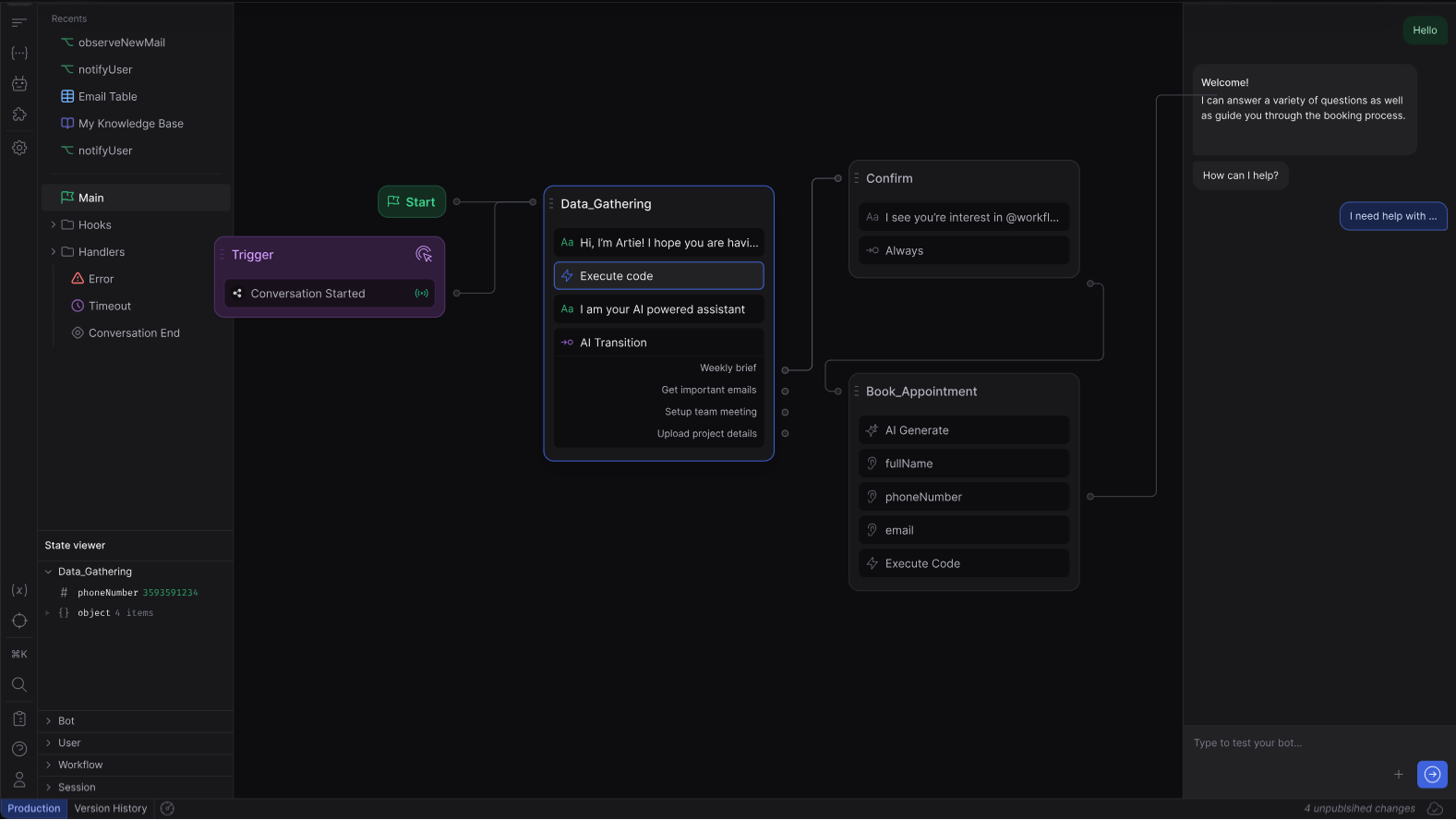
2. Botpress

Botpress is an open-source chatbot development platform used for building advanced and customizable chatbots. It is mostly used by developers and enterprises who need control over chatbot data and design. It includes built-in NLU capabilities to understand the intent and context of a specific query. This platform offers a visual flow editor that simplifies creating conversational flows and managing complex interactions without hardcore coding.

Botpress

Features

Offers customizable integration with systems
Inbuilt NLU (natural language understanding) to understand user intent
Seamless deployment across various platforms
Advanced analytics for improved accuracy

Suitability

Botpress is ideal for enterprises and technical developers who want full control over chatbot integration.

3. Dialogflow by Google

A cloud-based AI platform that helps developers create chatbots and voice assistants. Dialogflow formerly known as api.ai, leverages machine learning to understand natural language and makes it popular for developing user-friendly chatbots. Its drag-drop features and pre-built features make it beginner-friendly and the first choice of users

Dialogflow by Google

Features

Robust NLU to understand user intent
Easy integration with other platforms
Prebuilt templates and support media
User-friendly interface

Suitability

Dialogflow is suited for companies looking to build experienced chatbots backed by NLU technology and is useful for applications requiring multichannel support.

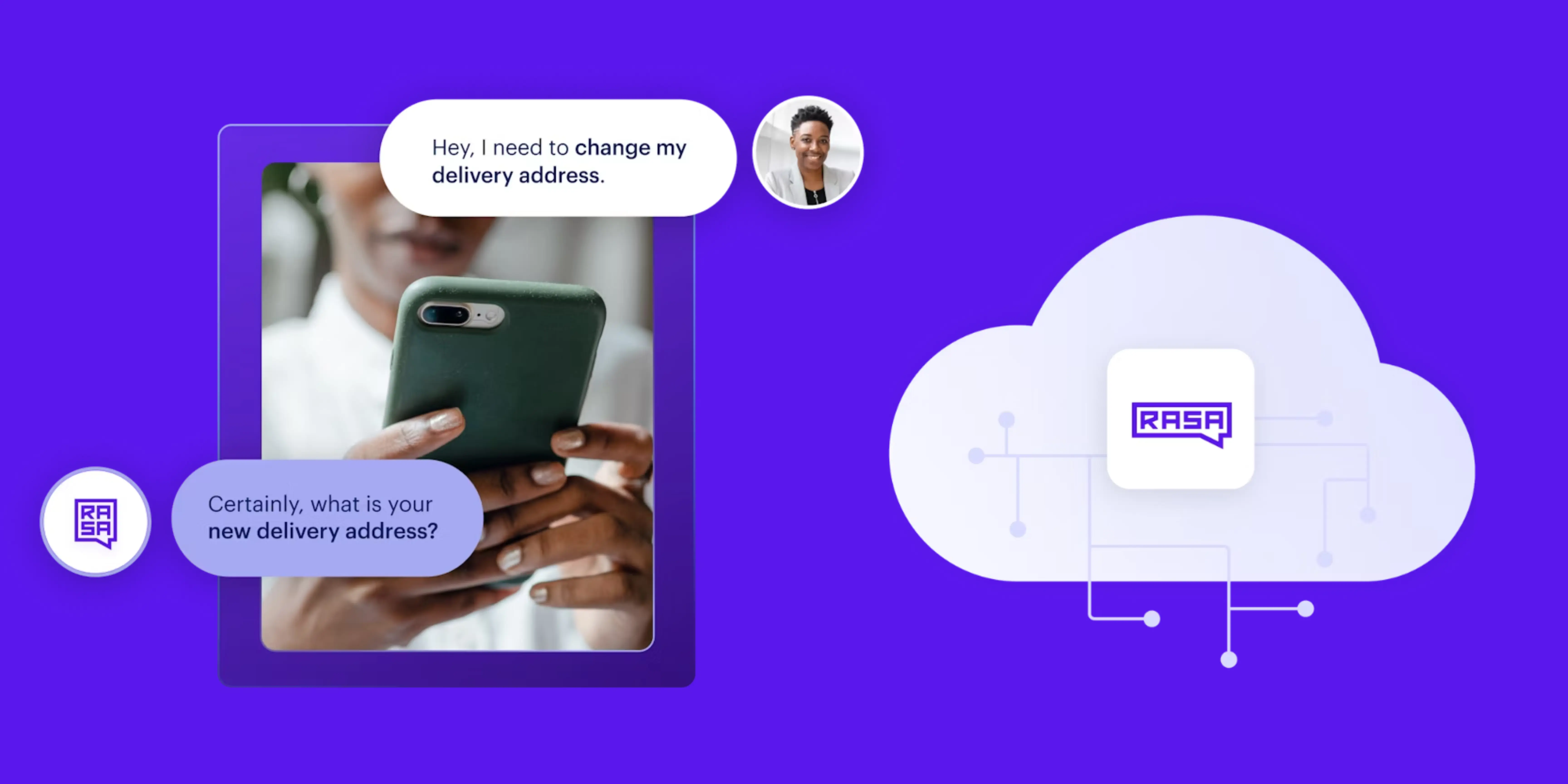
4. RASA

RASA is an open-source chatbot framework used to build, deploy, and manage chatbots and voice assistants. Among the available options, RASA is the best option for developers seeking full control over their chatbot data and optimization. The NLU capabilities in RASA allow the platform to understand the user intent behind a specific query.

Rasa

Features

The open-source nature provides the developers with freedom to modify the platform
Multi-language support system
Machine learning capabilities to understand user intent
Privacy and data control due to self-hosting
Suitable for complex workflows

Suitability

RASA is suitable for businesses looking for customizable software to build responsive chatbots and full control over their systems. It is suitable for complex models but may not be suited for those seeking no-code platforms.

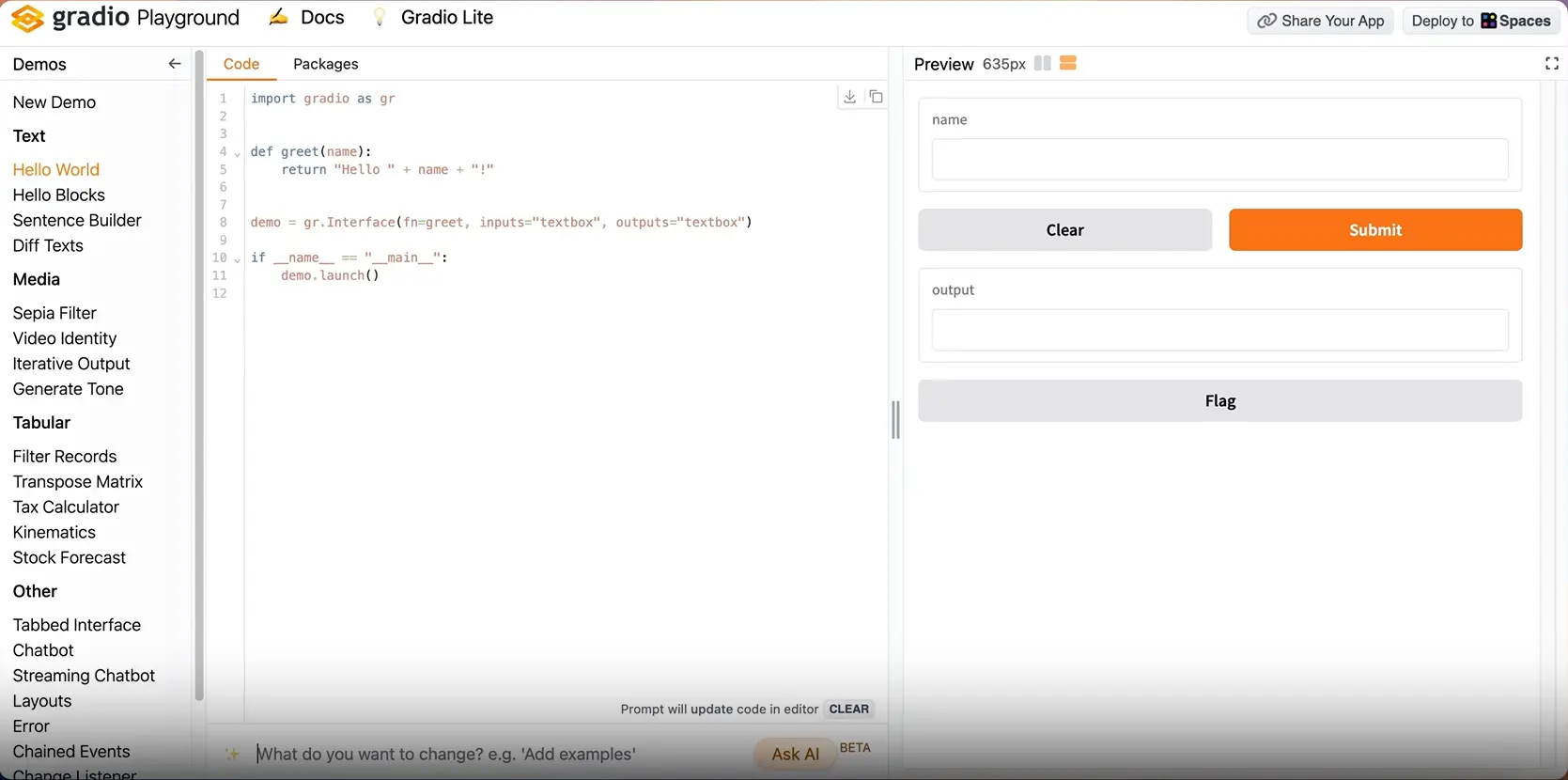
5. Gradio 5.0

Gradio 5.0 is an open-source Python library used for creating user-friendly machine-learning models. It enables rapid deployment of interactive demos which can be shared with users through web interfaces. It allows you to create interfaces in just a few lines of code with various graphics allowing users to interact with models in different ways.

Gradio 5

Features

User-friendly interface
Rapid prototyping is possible with a minimum code
Interactive testing and feedback options

Suitability

Gradio is an excellent choice for scientists, machine learning researchers, and developers looking for an interactive and user-friendly way to build a chatbot.

Future Trends in Chatbot Development

The field of chatbot development is evolving rapidly driven by various AI integrations.

In the coming years, chatbots will become more user-focused by offering personalized interaction. Through omnichannel integration, the user experience will be seamlessly integrated across various platforms.

Chatbots of the future will be smarter, more intuitive, and integral to digital interactions, enhancing customer experiences with ease.

In this blog, we have covered various frameworks for chatbot development. If you want to improve your customer relationship, you might be thinking of building a user-friendly chatbot. But building a chatbot from scratch is not easy, taking help from an experienced player in the market can make the process easier.

Trigma, a custom software development company, provides innovative and personalized solutions to its users. From Generative AI to Mobile App Development, we have provided excellent user-oriented services over the last 15 years.

Contact us at Trigma for a free consultation or Schedule a call with our experts!