+91-98558-85133
 +1(702)760-3099

60-Second Summary
- Multi-agent systems use an orchestrator to delegate tasks to specialized agents working in parallel reducing response time and handling complexity at scale.
- Agents self-correct, share information in real time, and combine large LLMs with smaller task-specific models for smarter, faster execution.
- Six architectures to choose from: hierarchical, human-in-the-loop, shared tools, sequential, database with tools, and memory transformation each suited to different business needs.
- Building one requires five steps: map your workflow, define each agent's role, enable communication via APIs or message queues, add business rules and AI for decision-making, then monitor and optimize continuously.
- Trigma helps businesses move from single-agent workflows to full multi-agent systems from ideation to deployment building solutions that learn, adapt, and reason.
What if, instead of one agent doing everything, you create a multi-agent system, where an orchestrator plans the sequence of tasks, understands user intent, and dispatches work to specialized agents.
These agents can work in parallel, and good parallelization significantly reduces response time.
But building an AI agent is less about writing code and more about validating necessity first, designing for model evolution, implementing guardrails, and monitoring continuously.
Let's discuss six steps to design and build multi-agent workflows.
What Are Multi-Agent AI Systems?
Instead of relying on a single model, multi-agent systems use multiple specialized agents that collaborate, communicate, and adapt. An orchestrator assigns tasks while agents gather data, analyze it, and act on it.
Agents can self-correct, learn from experience, and use both large language models and smaller task-specific models. Rather than one agent handling everything, multiple specialized agents work together to complete tasks efficiently.
How Do Multi-Agent AI Systems Work?
Here's how multi-agent systems operate:
1. Role Assignment and Task Delegation
At the core of any multi-agent system is an orchestrator agent. This agent is responsible for breaking down tasks, deciding which agents are needed, and delegating work based on each agent's capabilities.
2. Communication and Information Sharing
Agents exchange data through APIs, message passing, or shared memory. This allows them to share insights in real time and adjust workflows dynamically based on new information.
3. Reflection and Self-Correction
Unlike single-agent AI, multi-agent systems track progress and self-correct using:
- Task ledgers (tracking what has been completed vs. what remains)
- Feedback loops (agents double-check their own work)
- Dynamic replanning (if an approach fails, agents adjust their strategy)
4. Multi-LLM and Specialized Agents
Instead of using a large LLM for everything, multi-agent AI systems combine:
- A generalist LLM for reasoning and orchestration
- Smaller, fine-tuned models for specialized tasks
5. Execution and Continuous Learning
Once agents complete a task, multi-agent systems don't simply stop; they learn from each execution to improve future performance.
6 Ways to Build Multi-Agent AI Systems
Here are six approaches to building multi-agent architecture:
1. Hierarchical Structure
This approach uses a main agent that interacts with the user and delegates work to specialized sub-agents. Each sub-agent handles specific tasks such as vector searches, web queries, or connecting to tools like Slack or Gmail.
Think of it as a manager delegating work to team specialists. It works well for complex projects that require different types of expertise.
2. Human-in-the-Loop Architecture
With this approach, AI agents handle most of the work but can escalate to humans when needed. The system recognizes when to involve a person for important decisions or sensitive information.
This is ideal for situations where human judgment is essential.
3. Shared Tools Architecture
Multiple agents share the same set of tools but use them for different purposes similar to everyone in an office sharing a printer for different tasks. This reduces costs by eliminating the need to duplicate tools for each agent.
It works well when you want to keep costs down while still maintaining specialized agents.
4. Sequential Architecture
Agents work one after another, like an assembly line. The first agent completes its task and passes the results to the next, and so on. This makes it straightforward to track what happened at each step and works well for processes that must follow a strict order.
5. Database with Tools Architecture
This connects agents directly to your databases and equips them with tools to work with that data. One agent might retrieve information while another processes it. This is particularly useful for projects that require analyzing large volumes of data or generating reports.
6. Memory Transformation Architecture
Here, agents focus specifically on improving the system's memory. One agent pulls in new information while another organizes it, making the entire system smarter over time. This works well for knowledge bases that need to continuously learn and evolve.
The Step-by-Step Process for Developing Multi-Agent AI
Designing a multi-agent AI system isn't about building bots; it's about rethinking how work moves between systems and teams, then creating workflows powered by intelligent agents.
In a multi-agent system, each agent performs a specific job, and together they complete a full business process.
Here's a practical implementation guide for building multi-agent systems for enterprise automation:
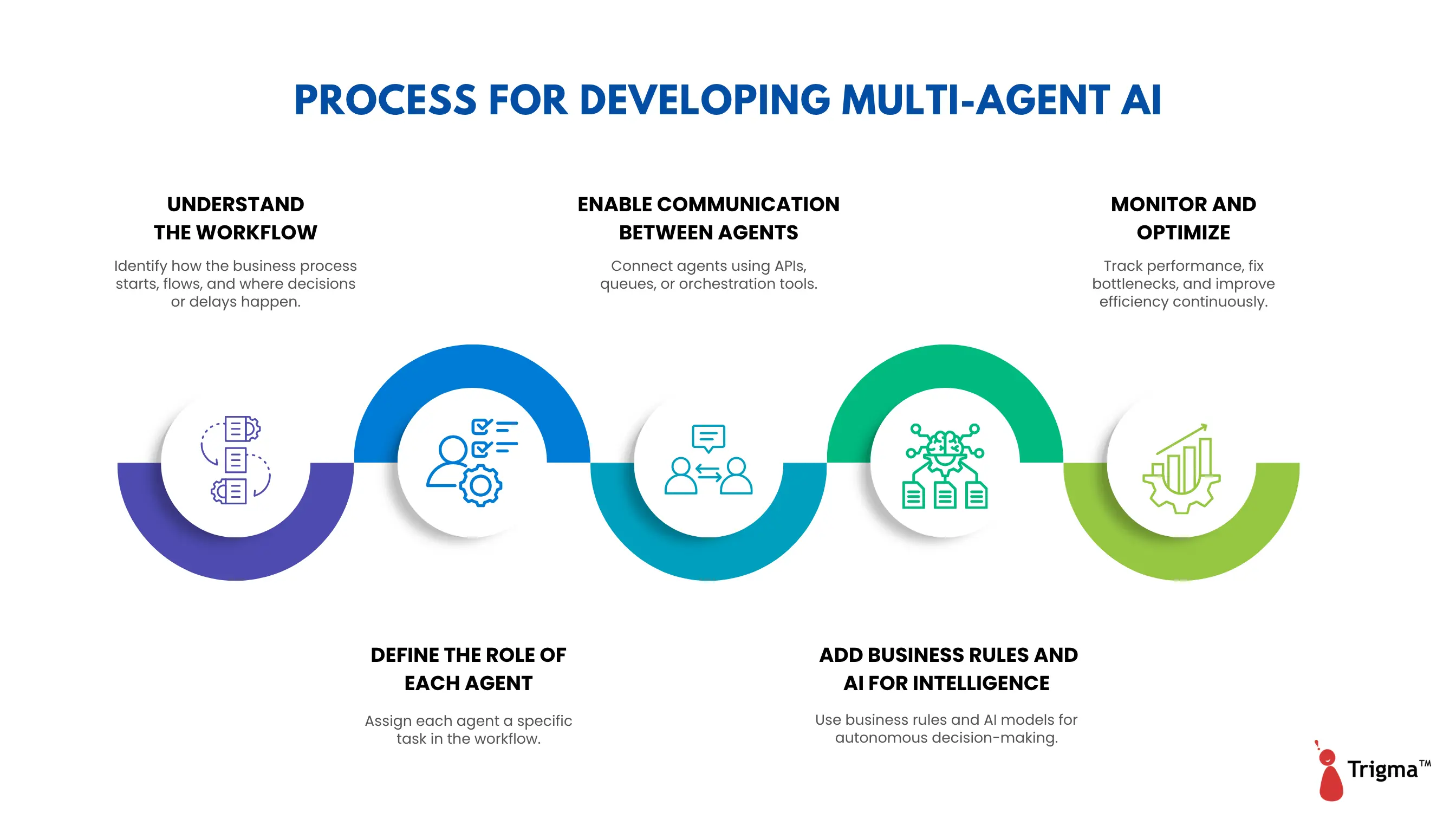
1. Understand the Workflow
Before creating any agent, you need to understand the business process like how work actually happens within your organization.
Ask the following questions:
- Where does the process start? For example, does an email arrive, a form gets submitted, or a file gets uploaded?
- Which tasks need to happen next?
- Which systems are involved — ERP, CRM, email systems, spreadsheets, databases?
- Where do humans make decisions?
- Where do delays typically occur?
Example
A typical vendor onboarding process:
- Vendor submits documents via email
- Team verifies PAN or GST number
- Team checks whether the vendor already exists in the ERP
- Manager reviews and approves
- Vendor record is created in the ERP
2. Define the Role of Each Agent
Once you understand the workflow, divide tasks among agents. Each agent should handle only one type of task.
|
Agent Type |
What It Does |
|
Email Agent |
Reads and classifies incoming emails |
|
Verification Agent |
Validates PAN, GST, or ERP data |
|
Document Agent |
Extracts information from attached documents |
|
Approval Agent |
Sends requests to managers or applies approval rules |
|
Update Agent |
Creates or updates records in the ERP |
3. Enable Communication Between Agents
Agents need to coordinate with each other to keep the workflow moving similar to how employees pass work between departments.
There are several ways to connect agents:
- APIs — Agents communicate directly with systems like SAP, Salesforce, ServiceNow, and internal databases
- Message queues — Agents place tasks in a queue for the next agent to pick up. Tools include Azure Queue, RabbitMQ, and Kafka, which help manage large volumes of tasks
- Orchestration engines — These tools automatically manage the workflow between agents. Examples include Azure AI Studio and LangChain
Here's how agent communication flows in the vendor onboarding example:
- The email agent detects a vendor request and triggers the document agent
- The document agent extracts vendor details and triggers the verification agent
- The verification agent checks PAN/GST and passes the task to the approval agent
- Once approved, the update agent creates the vendor record in the ERP
4. Add Business Rules and AI for Intelligence
Since agents are autonomous, they need to make decisions independently. This can be done using rules or AI models:
- Predefined rules — Based on company policy, for example: if invoice value exceeds ₹50,000, CFO approval is required
- AI/LLMs — Used for smarter actions such as understanding email intent, reading PDFs, or handling unstructured information
Tools used in this layer include
- Rule engines such as Drools and Power Automate
- AI models such as GPT and Azure OpenAI
- OCR engines for reading and extracting data from documents
5. Monitor and Optimize
After deploying the system, track how agents perform. Ongoing monitoring helps you improve the system over time.
Key metrics to track:
- How many tasks did agents complete successfully?
- Which agents failed most frequently?
- Where are the bottlenecks or delays?
- How much time was saved compared to manual processes?
How Trigma Can Help You Build Multi-Agent AI Systems
As a multi-agent AI development company, Trigma takes the time to understand both your technical challenges and your long-term business objectives.
After working with hundreds of businesses, we've noticed a clear pattern : organizations are increasingly moving from single-agent workflows to multi-agent systems.
The reason? To tackle complex problems faster, scale capabilities, and build systems that mirror real-world team collaboration.
We guide businesses from ideation to deployment using multi-agent architecture, delivering systems that learn, adapt, and reason not just automate.
Ready to move from basic automation to intelligent multi-agent systems?
FAQs
What is the architecture of a multi-agent system in AI?
A multi-agent system consists of multiple autonomous agents, an operating environment, and a communication mechanism. Each agent functions independently, interacts with other agents, and makes decisions based on its own local knowledge.
What is a real-world example of a multi-agent AI system?
One example is a fleet of autonomous drones used in search and rescue operations. Each drone acts as an individual agent, surveying areas, navigating obstacles, and communicating with other drones to coordinate coverage and respond to changing conditions in real time.
What does it cost to build a multi-agent AI system?
The cost of building a multi-agent AI system ranges from $10,000 to $500,000. Pricing depends on factors such as the number of agents involved, system complexity, hardware integration requirements, simulation needs, and the ongoing costs of maintenance and AI training.