performance icon
Top IT Services Company 2025 Top Software Developers 2025 Top Generative AI Company 2025 G2 High Performer Winter 2025 G2 Leader Winter 2025 AI Deployment Company 2024 Top Software Development Company in USA for 2024 Top ReactJs Company in USA for 2024

How to Build Multi-Agent AI Systems for Enterprise Automation

60-Second Summary

  • Multi-agent systems use an orchestrator to delegate tasks to specialized agents working in parallel reducing response time and handling complexity at scale.
  • Agents self-correct, share information in real time, and combine large LLMs with smaller task-specific models for smarter, faster execution.
  • Six architectures to choose from: hierarchical, human-in-the-loop, shared tools, sequential, database with tools, and memory transformation each suited to different business needs.
  • Building one requires five steps: map your workflow, define each agent's role, enable communication via APIs or message queues, add business rules and AI for decision-making, then monitor and optimize continuously.
  • Trigma helps businesses move from single-agent workflows to full multi-agent systems from ideation to deployment building solutions that learn, adapt, and reason.

What if, instead of one agent doing everything, you create a multi-agent system, where an orchestrator plans the sequence of tasks, understands user intent, and dispatches work to specialized agents.

These agents can work in parallel, and good parallelization significantly reduces response time.

But building an AI agent is less about writing code and more about validating necessity first, designing for model evolution, implementing guardrails, and monitoring continuously.

Let's discuss six steps to design and build multi-agent workflows.

What Are Multi-Agent AI Systems?

Instead of relying on a single model, multi-agent systems use multiple specialized agents that collaborate, communicate, and adapt. An orchestrator assigns tasks while agents gather data, analyze it, and act on it.

Agents can self-correct, learn from experience, and use both large language models and smaller task-specific models. Rather than one agent handling everything, multiple specialized agents work together to complete tasks efficiently.

How Do Multi-Agent AI Systems Work?

Here's how multi-agent systems operate:

1. Role Assignment and Task Delegation

At the core of any multi-agent system is an orchestrator agent. This agent is responsible for breaking down tasks, deciding which agents are needed, and delegating work based on each agent's capabilities.

2. Communication and Information Sharing

Agents exchange data through APIs, message passing, or shared memory. This allows them to share insights in real time and adjust workflows dynamically based on new information.

3. Reflection and Self-Correction

Unlike single-agent AI, multi-agent systems track progress and self-correct using:

  • Task ledgers (tracking what has been completed vs. what remains)
  • Feedback loops (agents double-check their own work)
  • Dynamic replanning (if an approach fails, agents adjust their strategy)

4. Multi-LLM and Specialized Agents

Instead of using a large LLM for everything, multi-agent AI systems combine:

  • A generalist LLM for reasoning and orchestration
  • Smaller, fine-tuned models for specialized tasks

5. Execution and Continuous Learning

Once agents complete a task, multi-agent systems don't simply stop; they learn from each execution to improve future performance.

6 Ways to Build Multi-Agent AI Systems

Here are six approaches to building multi-agent architecture:

1. Hierarchical Structure

This approach uses a main agent that interacts with the user and delegates work to specialized sub-agents. Each sub-agent handles specific tasks such as vector searches, web queries, or connecting to tools like Slack or Gmail.

Think of it as a manager delegating work to team specialists. It works well for complex projects that require different types of expertise.

2. Human-in-the-Loop Architecture

With this approach, AI agents handle most of the work but can escalate to humans when needed. The system recognizes when to involve a person for important decisions or sensitive information.

This is ideal for situations where human judgment is essential.

3. Shared Tools Architecture

Multiple agents share the same set of tools but use them for different purposes similar to everyone in an office sharing a printer for different tasks. This reduces costs by eliminating the need to duplicate tools for each agent.

It works well when you want to keep costs down while still maintaining specialized agents.

4. Sequential Architecture

Agents work one after another, like an assembly line. The first agent completes its task and passes the results to the next, and so on. This makes it straightforward to track what happened at each step and works well for processes that must follow a strict order.

5. Database with Tools Architecture

This connects agents directly to your databases and equips them with tools to work with that data. One agent might retrieve information while another processes it. This is particularly useful for projects that require analyzing large volumes of data or generating reports.

6. Memory Transformation Architecture

Here, agents focus specifically on improving the system's memory. One agent pulls in new information while another organizes it, making the entire system smarter over time. This works well for knowledge bases that need to continuously learn and evolve.

The Step-by-Step Process for Developing Multi-Agent AI

Designing a multi-agent AI system isn't about building bots; it's about rethinking how work moves between systems and teams, then creating workflows powered by intelligent agents. 

In a multi-agent system, each agent performs a specific job, and together they complete a full business process.

Here's a practical implementation guide for building multi-agent systems for enterprise automation:

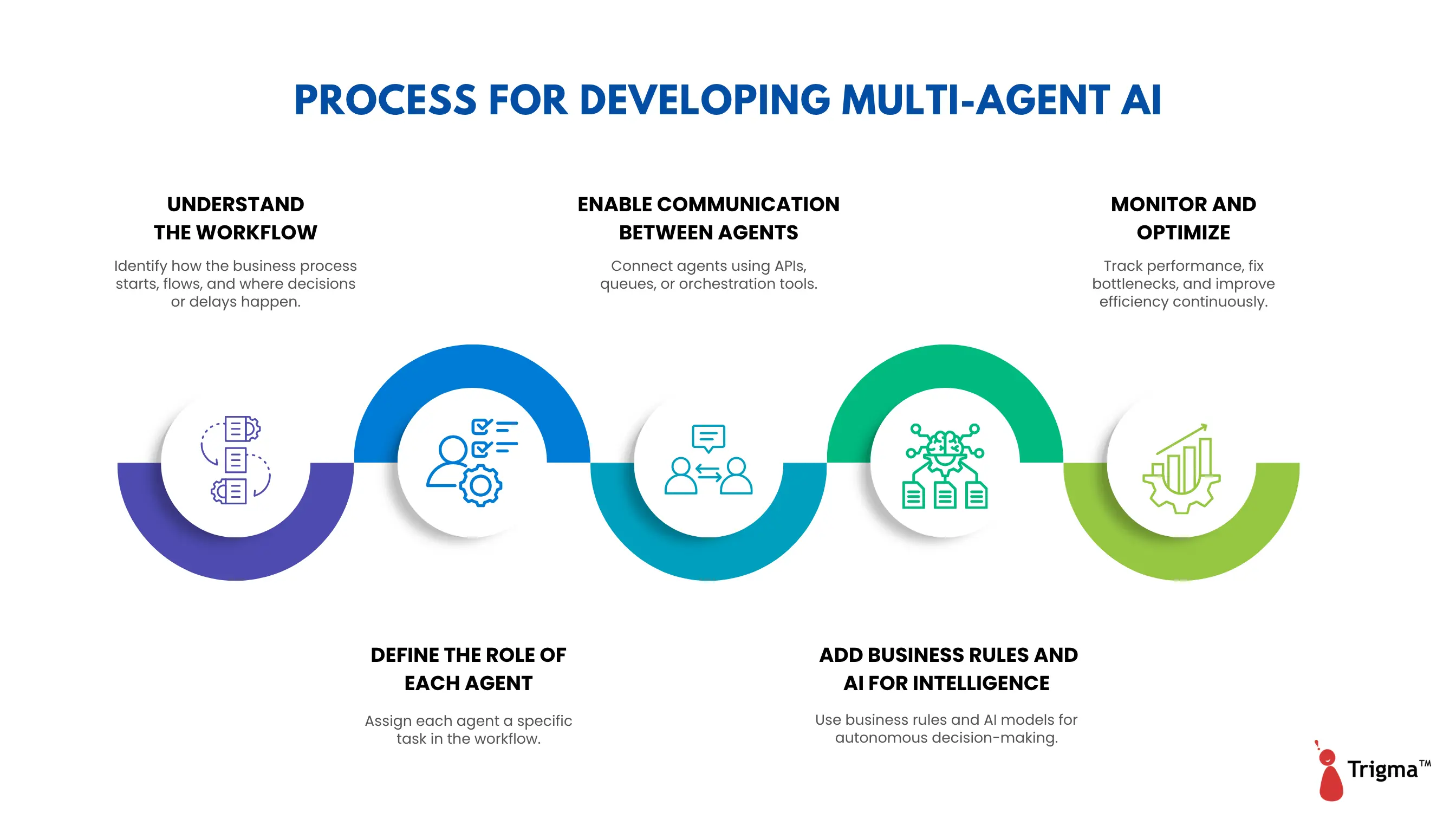
5-step process for developing multi-agent AI systems — from workflow mapping to monitoring and optimization

1. Understand the Workflow

Before creating any agent, you need to understand the business process like how work actually happens within your organization.

Ask the following questions:

  • Where does the process start? For example, does an email arrive, a form gets submitted, or a file gets uploaded?
  • Which tasks need to happen next?
  • Which systems are involved — ERP, CRM, email systems, spreadsheets, databases?
  • Where do humans make decisions?
  • Where do delays typically occur?

Example

A typical vendor onboarding process:

  • Vendor submits documents via email
  • Team verifies PAN or GST number
  • Team checks whether the vendor already exists in the ERP
  • Manager reviews and approves
  • Vendor record is created in the ERP

2. Define the Role of Each Agent

Once you understand the workflow, divide tasks among agents. Each agent should handle only one type of task.

Agent Type

What It Does

Email Agent

Reads and classifies incoming emails

Verification Agent

Validates PAN, GST, or ERP data

Document Agent

Extracts information from attached documents

Approval Agent

Sends requests to managers or applies approval rules

Update Agent

Creates or updates records in the ERP

3. Enable Communication Between Agents

Agents need to coordinate with each other to keep the workflow moving similar to how employees pass work between departments.

There are several ways to connect agents:

  • APIs — Agents communicate directly with systems like SAP, Salesforce, ServiceNow, and internal databases
  • Message queues — Agents place tasks in a queue for the next agent to pick up. Tools include Azure Queue, RabbitMQ, and Kafka, which help manage large volumes of tasks
  • Orchestration engines — These tools automatically manage the workflow between agents. Examples include Azure AI Studio and LangChain

Here's how agent communication flows in the vendor onboarding example:

  • The email agent detects a vendor request and triggers the document agent
  • The document agent extracts vendor details and triggers the verification agent
  • The verification agent checks PAN/GST and passes the task to the approval agent
  • Once approved, the update agent creates the vendor record in the ERP

4. Add Business Rules and AI for Intelligence

Since agents are autonomous, they need to make decisions independently. This can be done using rules or AI models:

  • Predefined rules — Based on company policy, for example: if invoice value exceeds ₹50,000, CFO approval is required
  • AI/LLMs — Used for smarter actions such as understanding email intent, reading PDFs, or handling unstructured information

Tools used in this layer include

  • Rule engines such as Drools and Power Automate
  • AI models such as GPT and Azure OpenAI
  • OCR engines for reading and extracting data from documents

5. Monitor and Optimize

After deploying the system, track how agents perform. Ongoing monitoring helps you improve the system over time.

Key metrics to track:

  • How many tasks did agents complete successfully?
  • Which agents failed most frequently?
  • Where are the bottlenecks or delays?
  • How much time was saved compared to manual processes?

How Trigma Can Help You Build Multi-Agent AI Systems

As a multi-agent AI development company, Trigma takes the time to understand both your technical challenges and your long-term business objectives. 

After working with hundreds of businesses, we've noticed a clear pattern : organizations are increasingly moving from single-agent workflows to multi-agent systems.

The reason? To tackle complex problems faster, scale capabilities, and build systems that mirror real-world team collaboration.

We guide businesses from ideation to deployment using multi-agent architecture, delivering systems that learn, adapt, and reason not just automate.

Ready to move from basic automation to intelligent multi-agent systems?

FAQs

What is the architecture of a multi-agent system in AI?

A multi-agent system consists of multiple autonomous agents, an operating environment, and a communication mechanism. Each agent functions independently, interacts with other agents, and makes decisions based on its own local knowledge.

What is a real-world example of a multi-agent AI system?

One example is a fleet of autonomous drones used in search and rescue operations. Each drone acts as an individual agent, surveying areas, navigating obstacles, and communicating with other drones to coordinate coverage and respond to changing conditions in real time.

What does it cost to build a multi-agent AI system?

The cost of building a multi-agent AI system ranges from $10,000 to $500,000. Pricing depends on factors such as the number of agents involved, system complexity, hardware integration requirements, simulation needs, and the ongoing costs of maintenance and AI training.

Single Agent vs Multi-Agent AI Systems

60-Second Summary

  • Single-agent systems run on one model with one goal ; simpler to build, debug, and cost-effective for small to medium businesses with straightforward workflows.
  • Multi-agent systems deploy specialized agents working in parallel, making them ideal for complex, large-scale enterprise operations that demand speed and accuracy.
  • Single agents work best for focused tasks like chatbots or targeted automation, but fall short when scalability and parallel processing are required.
  • Multi-agent systems offer key advantages including scalability, parallel decision-making, fault tolerance, and reduced hallucinations through cross-agent verification.
  • However, studies show multi-agent systems fail 60–80% of the time due to specification issues, inter-agent misalignment, and coordination breakdowns.
  • The right choice depends on your workflow like sequential tasks favor single agents, while parallelizable tasks with independent subtasks favor multi-agent architectures.

Choosing between a single-agent and multi-agent AI system could be one of the most consequential decisions for your operations. Get it wrong, and you're either over-engineering a simple problem or under-powering a complex one.

Single-agent systems prioritize simplicity — one model, one goal, easy to build and debug. Multi-agent systems distribute intelligence, with specialized agents working in parallel to handle complexity at scale.

The right choice comes down to understanding what each system offers, where each falls short, and what your business actually demands.

What are Single AI Agents?

A single AI agent is essentially one AI assistant handling everything like research, analysis, visualizations, and writing with no handoffs, no coordination, just one system to manage.

For rapid prototyping or targeted workflows, a single AI agent can deliver high-quality results without the overhead of a multi-agent setup.

The agent connects to memory for context retention and tools for performing tasks.

This setup works great for straightforward applications where one agent manages all user interactions, such as simple chatbots or focused assistants.

Flowchart showing the single AI agent workflow — from user request through agent core, tool selection, web search, code execution, memory/files, external APIs, observe and reflect, task done decision, and final output with a feedback loop

Benefits of Single AI Agents over Multi-Agent Systems

In single agent architecture, one agent handles the entire workflow. Think of it as one highly capable generalist, and investing in such architecture offers several benefits:

What are the Limitations of a Single AI Agent for Enterprise?

Here are a few downsides of building single AI agents for your business:

What is a Multi-Agent AI System?

A multi-agent system lets you build a team of specialists.

Instead of one generalist, you have focused roles; agents that excel at handling different data sources, one agent specializes in code generation, another handles data retrieval, and a third specializes in synthesis and planning.

Each agent goes deeper in its own domain, which helps maintain quality across the board.

Unlike single agents, multiple agents use a central orchestration layer that manages and directs the activities of individual agents.

Flowchart showing the multi-agent AI workflow — from user request through orchestration layer, task decomposer, agent selection layer, parallel data, reasoning and research agents, tools and data layer, collaboration and output layer, response synthesis agent, output to user, and monitoring and feedback loop

Real World Example of Multi Agent Systems

Consider a medical equipment management system where every agent performs a unique function.

Each agent in this case acts like a microservice, communicating with the others. 

Together, they function like a collaborative team, with every agent specializing in its own work with greater autonomy.

What are the Benefits of Multi-Agent AI Systems Over Single AI Agents?

Multi-agent AI works on a divide-and-conquer principle, assigning specific roles to agents that a single-agent setup cannot provide.

Here are a few advantages your enterprise can gain through multi-agent workflows:

1. Scalability

Instead of one agent doing everything, tasks are distributed to specialist agents who are experts in a specific domain. Multi-agent architectures are well-suited for industries like logistics, where demand changes continuously.

You can add agents to handle increasing user requests during peak hours and scale them down when not needed. 

2. Parallel Decision-Making

In traditional automation, tasks happen sequentially, but in multi-agent ecosystems, work is split across multiple AI agents.

This means different tasks can be handled at the same time, such as creating promotional content, running advertising campaigns, studying market trends, tracking campaign performance, and generating reports.

The result?

Everything gets done faster because it happens in parallel.

3. Robustness and Fault Tolerance

Multi-agent systems remain operational even if one agent fails, as it won't bring down the entire system.

For example, in autonomous vehicle coordination, if a car's sensor agent fails, other agents can share data to keep navigation safe. Redundancy can also be built in, where multiple agents monitor and cross-check each other's progress.

Similarly in cybersecurity, agents can monitor different network layers, so an attack on one layer doesn't affect the others. Developers can recover from failures by restarting agents or redistributing their tasks.

Note:

Multi-agent systems well-suited for critical applications like disaster response, where systems must handle unpredictable situations.

4. Reduced Hallucinations

Combining multiple agents can help reduce hallucinations and bias. Here’s how -

  • Agents can question each other to clarify and refine answers.
  • One agent's output can be verified by others.
  • Multiple agents can compare answers and agree on the best one.
  • Agents can access up-to-date information, reducing errors from outdated knowledge.

Note:

While multi-agent systems don't automatically eliminate hallucinations, they add checks, collaboration, and real-time data access to deliver more reliable results across the entire workflow.

What are the Disadvantages of Using Multi-Agent Systems for Enterprises?

Though multi-agent systems are gaining popularity with frameworks like CrewAI and AutoGen getting traction. Studies show that multi-agent systems fail 60–80% of the time, and they don't fail silently.

They repeat steps, forget context, ignore each other's messages, or verify things incorrectly. Sometimes, they don't even know when to stop.

What's the Difference Between Single AI Agents and Multi-Agent Systems?

Here's how single agent AI differs from multi-agent AI in terms of collaboration, scalability, and efficiency.

[table “” not found /]

Build Smarter Single and Multi-Agent AI Systems With Trigma

Whether you want to build single AI agents or a multi-agent architecture, we can help you choose the right approach. 

It depends on your goals such as multi-agent systems are generally better suited for parallelizable tasks with independent subtasks, while single agents work better when tasks must be completed sequentially.

Both approaches have their own merits, but it all comes down to your use case.

Ready to build your own agentic system?

Whether you need a focused single agent or a full multi-agent system, Trigma's AI engineers help you design, build, and deploy the right architecture for your business goals.

FAQs

Why are agents viewed as more advanced than traditional AI chatbots?

AI agents are considered more advanced than traditional chatbots because they can operate independently with little or no human input.

While chatbots mainly respond to prompts and depend on user instructions, AI agents can make decisions, adapt to different situations, and take actions to achieve goals on their own.

In short, chatbots react, but AI agents can think, adapt, and act independently.

Can you give some real-world examples of single AI agents?

Examples of single agents include OpenAI's Operator, which can control computers on behalf of users, and Anthropic's Claude, which can interact with systems by moving cursors and entering data.

Are there any challenges in AI agent development?

Key challenges persist across agentic AI systems. Reliability remains a concern, as models can still produce incorrect or misleading outputs. Most are designed for single-pass responses, limiting their ability to explore, iterate, or self-correct. 

Creativity is another gap; responses can lack the nuance and originality that complex business decisions demand. Finally, reasoning capabilities, while improving, can still falter on questions that require deeper logical thinking.

What Is AI Orchestration? A Guide to Coordinating AI Agents and Workflows

60-Second Summary

  • AI orchestration is the practice of connecting multiple AI tools, agents and data systems so they work together as one coordinated system — not in isolation.
  • It works through three layers:
    1. Intelligence Layer – understands intent and decides what to do
    2. Integration Layer – connects tools via APIs to execute actions
    3. Orchestration Layer – coordinates workflows, tracks progress and manages handoffs
  • The result? Smoother workflows, faster decisions, better scalability and real financial impact.
  • Here's how to implement it in 5 steps:
    1. Define your business goals and prioritize use cases
    2. Audit and consolidate your existing tech stack
    3. Establish governance, risk controls and compliance frameworks
    4. Deploy pilot projects first, then scale what works
    5. Monitor continuously and optimize as you go
  • Ready to orchestrate your workflows? Let's build it together.

Every enterprise is deploying AI. But deployment isn't the problem; coordination is.

Most organizations are running disconnected models, isolated agents and fragmented data pipelines. Each tool makes decisions in a vacuum. No shared context. No governance. No unified view of what's actually happening across the business.

The result? Duplicated costs, slower decisions and AI investments that don't compound.

AI orchestration fixes this by connecting your models, agents and infrastructure into one coordinated system where every tool knows its role, every decision has a chain of accountability and your AI stack scales without chaos.

Let’s break down what AI orchestration is, how it works, the business benefits it delivers and how to build a strategy that drives measurable outcomes not just technical progress.

What is AI Orchestration?

AI orchestration involves designing a system where multiple AI tools and humans work together to achieve a common goal. It's not about writing the prompt; it's about designing the system that connects everything.

This means the developer is no longer writing the code; they're designing the machine that does the work.

Diagram illustrating how AI orchestration works — a user submits a request to a central orchestrator that plans and delegates tasks to specialized agents, which use tools and data to execute them, with results returned to the orchestrator and final output delivered back to the user

Take a customer support ticket, for example. Instead of one AI answering it, you design the workflow with a human in the loop framework.

One agent fetches the user data, another agent drafts a response, another checks for company policy. Before the message is sent, a human reviews and approves to ensure its accuracy.

While most enterprises focus on building AI agents, only a few are mastering orchestration.

Isolated AgentAI Orchestration
An isolated agent can answer questions, automate tasks and optimize micro workflows.AI Orchestration
- directs specialized agents across workflows,
- manages multi-step decision flows,
- controls execution flow and
- transforms fragmented tools into coordinated systems.

Working Process of AI Orchestration

In AI orchestration, several components work together — models, data, AI agents, automation and workflows. These systems know what happened, why it happened and what they should do about it. Let's discuss these components in detail.

1. Intelligence Layer

The intelligence layer analyzes user input and uses reasoning to understand and interpret the intent behind it. It then decides what action to take.

This layer uses large language models and natural language processing to understand speech or text input. It also uses intent analysis to understand what the person actually wants and sentiment analysis to gauge how they're feeling.

It then generates relevant responses, determines the next best action and makes workflow decisions.

For example, if a customer messages your website chatbot about a missing order, the intelligence layer reads the complaint, understands the problem, interprets the customer's tone and sets out a plan of action to resolve the issue.

2. Integration Layer

The integration layer connects all the AI tools and databases needed to execute the intelligence layer's plan. Unlike the intelligence layer, which decides what to do, the integration layer actually does it.

These tools are connected through APIs, which link AI to your existing platforms such as Salesforce, Slack or Gmail.

So if your AI agent decides the best course of action is to issue a full refund, it connects with your ecommerce platform's API and webhooks to execute that refund.

For example, whenever a customer places an order on your Shopify store, a webhook automatically logs the order in your CRM, sends your shipping department a Slack alert and emails the customer a receipt.

3. Orchestration Layer

The orchestration layer coordinates the entire workflow. It decides which AI tools to use based on the specific event it's responding to, determines what steps to take and ensures all actions follow business rules.

This layer also tracks progress and coordinates contingency plans. For instance, if a customer is still unhappy after an action is taken.

It also decides which tasks should be handled autonomously and which should be handed off to human agents. It manages:

  • Workflow engines (tools that let you design and execute step-by-step business processes)
  • Event triggers (that start the workflow)
  • Agent frameworks (frameworks that manage your AI agents, monitor task progress and select or connect different tools)

Benefits of AI Agent Orchestration

Here are a few key benefits of what AI agent orchestration can do for your business.

Six key benefits of AI orchestration including smooth workflow management, better scalability, easy monitoring and control, faster decision making, financial impact and better collaboration

1. Smooth Workflow Management

It eliminates data silos across applications and communication channels, reduces redundancies and gives you visibility into AI application performance.

Instead of each AI tool working in isolation, AI orchestration coordinates different tools, models and data systems so they work together seamlessly with no manual coordination required.

2. Better Scalability

As AI projects grow, businesses begin using more models, tools and data systems that become difficult to manage manually. AI orchestration automates this process, making it easier to add or update models, data pipelines and APIs.

This allows businesses to scale their AI operations faster without manually managing every component.

3. Easy Monitoring and Control

AI orchestration frameworks make it easier to monitor the performance of AI models and systems. You can see which tasks are running, which have failed and where improvements are needed.

Because all models and AI agents are orchestrated, businesses can improve performance and control unnecessary costs.

4. Faster Decision Making

AI orchestration allows different AI models to collaborate in a closed loop, meaning more data can be analyzed, processed and acted on helping organizations make faster decisions.

For example, retailers use AI orchestration to connect systems such as product recommendations, inventory tracking and customer behavior analysis. 

When a customer views a product, the system analyzes their behavior, checks inventory availability and instantly suggests similar products.

This enables faster decisions around stock, pricing and promotions.

5. Better Collaboration

In many organizations, different departments build their own AI systems that don't communicate with each other, causing duplicated work and siloed information.

AI orchestration solves this by connecting different AI models and tools so they work together. It also helps teams share knowledge, resolve problems faster and improve AI systems more effectively.

6. Creates Financial Impact

AI orchestration helps you achieve faster time-to-value on your AI investments by automating the deployment, training and integration phases of AI adoption.

By automating routine, low-value business processes end to end, it delivers shorter resolution times, lower risk of costly errors and better-optimized business resources.

How To Implement AI Orchestration For Your Business

Orchestrating AI systems isn't just about scaling; it's about creating a smooth transition that connects agents, data and tools together. Here's how to build your AI orchestration strategy in five steps.

Staircase diagram showing 5 steps to implement AI orchestration — define goals and use cases, consolidate your tech stack, set governance risk and controls, deploy pilot projects and scale, and monitor and continually optimize

1. Determine Your Business Goals and Prioritize Use Cases

Identify what you want to achieve with AI orchestration and how it supports your overall business goals. This prevents a "tech-first mindset" and ensures internal alignment from the start.

Once business goals are defined, identify specific, high-impact use cases such as ecommerce personalization, omnichannel virtual support agents or dynamic workforce planning.

2. Streamline Systems and Consolidate Your Tech Stack

Audit your existing tech stack and applications to identify redundancies, assess interoperability and review usage trends.

Use APIs and orchestration platforms to integrate everything into one collaborative, AI-powered system so everything you need is in one place.

3. Establish Governance, Risk Management and Controls

Create policies, guardrails and monitoring frameworks that ensure a compliant, secure and responsible approach to AI.

Consider forming a governance council to define compliance standards, create an AI governance policy and set protocols for monitoring and escalation. This includes:

  • Audit logging
  • AI bias and fairness checks
  • Data retention and privacy strategies
  • Approval workflows
  • Model monitoring

4. Deploy Pilot Projects and Expand at Scale

Start with high-impact pilot projects. Focus on agile development, feedback loops and adaptability.

Then scale only proven workflows, prioritize reusable orchestration components like templates and connectors, and monitor analytics before gradually expanding. This prevents risky "big bang" rollouts and keeps momentum going.

5. Monitor and Continually Optimize

Treat your orchestration system as a living, evolving asset ; one you continually measure, learn from and improve.

Track KPIs such as time to deployment, reusability rate, adoption metrics and latency. Run A/B tests, review results with stakeholders regularly and automate alerts for cost anomalies or model performance drift.

How Trigma Can Help You Orchestrate AI Systems?

With Trigma, you can take your orchestration to the next level. By connecting AI agents directly to your business data, we help you create, optimize and monitor your agentic AI workflows  ensuring your agents not only work together but align with your business goals.

Ready to Orchestrate Your AI at Scale?

We help enterprises connect agents, data and workflows into one governed, scalable system.

FAQs

How do I know whether building an in-house AI team or outsourcing is the right option?

If you want to launch AI MVP quickly and have a limited budget, outsourcing is the most practical option. However, if AI is a core part of your long-term product strategy, building your own in-house team may be the better investment.

Can outsourcing AI development be risky?

Yes, outsourcing can become risky when the vendor lacks domain expertise, uses outdated technology stacks, or has no security policies in place.

Can I build an in-house team while also outsourcing AI development?

Yes. A small in-house team can focus on core strategic decisions, while an outsourced agency handles execution and product development.

In-House AI Development vs Outsourcing: What CTOs Need to Know

60-Second Summary

  • The world's most successful companies like Tesla, Amazon, Apple didn't build everything internally. They partnered with external vendors to move faster and smarter.
  • Building an in-house AI team gives you full control, IP ownership, and data security but realistically costs $180K+ per engineer and takes 6–12 months before delivering measurable value.
  • Outsourcing plugs you into a team that already has frameworks, deployment pipelines, and niche expertise in areas like NLP and computer vision; your MVP can be live in weeks.
  • Cost-wise, outsourcing shifts you from paying per headcount to paying per project, which is significantly more manageable for startups and early-stage builds.
  • The real trade-off isn't quality; it's control vs. speed. Strong communication, clear NDAs, and a dedicated project manager close that gap quickly.

Outsourcing is bad and you might think that we should rather build an AI team internally. But that is only half the story. 

The most successful companies in the world, such as Amazon, Apple, Tesla, and Alibaba, have not achieved their status through internal efforts alone. Tesla, for example, is not just selling cars; it is selling software solutions like the Tesla Version 7.0 software.

This has been made possible not just through their internal software development teams, but also through the third-party vendors (external teams) they have partnered with to support their IT and AI initiatives.

Just like Tesla, if you want to launch your AI product but lack the budget, technical expertise, or existing infrastructure, then outsourcing may be the solution for you.

Read this blog to learn how in-house AI development differs from hiring a dedicated AI development team.

What is an In-house Team?

Building an in-house AI team involves hiring, training, and managing AI experts who work directly within your organization. These include chief product officer, data scientists, data engineers, MLOps engineers, AI product manager etc.

While this gives you full control, it requires a significant investment of time and budget, along with ongoing management oversight.

You will also need a long-term hiring plan and substantial funding. When it comes to integrating AI into existing systems, the process can become complex, especially if your infrastructure or requirements are evolving.

What Benefits Does Building an In-house AI Team Offer?

Here are a few advantages your business will gain by building an AI team in-house:

1. Maximum Control and IP Ownership

You get complete control over the development process from planning to deployment including decisions about priorities, methodologies, and timelines. 

Because you own the project, you can make quick decisions and ensure that your AI solutions align with specific use cases. The intellectual property you create and the models you train remain entirely yours.

2. Deep Domain Knowledge

An in-house AI development team can integrate with your company's culture and processes, making collaboration easier. They become familiar with your industry, its nuances, and its challenges before building an AI solution.

3. No Security Breaches

Building an in-house AI team means keeping your sensitive data safe within the organization, as your team controls where data is stored, who can access it, and how it is used. 

They will comply with existing security policies and compliance standards such as HIPAA and GDPR, which reduces the risk of data exposure. When no third party or vendor is involved, confidential data is better safeguarded.

Disadvantages of Building an In-house AI Development Team

Despite its advantages, the in-house approach may not always be the best option. Here are several drawbacks:

1. High Cost of Hiring

When teams say "we will build in-house," they often do not factor in the real costs associated with developing generative AI applications and agentic AI systems. Before shipping anything to production, you need to hire experienced AI engineers, data scientists, and developers.

For instance, hiring an AI agent developer in the US demands a salary of $180,000 to $250,000 per year. On top of that, there are additional expenses such as retirement benefits, retention bonuses, and insurance.

2. Limited Expertise in Tech

Finding talented professionals with niche AI expertise is increasingly challenging, and even when you find top-tier talent, retaining them becomes a significant concern.

One study states that 85% of companies have postponed their AI projects due to the AI talent shortage.

Since artificial intelligence is a broad field, building an AI solution requires expertise across areas such as natural language processing and machine learning. 

Even among tech companies that have found AI developers at competitive rates, nearly 44% are still willing to increase salaries for AI/ML roles.

If you cannot find a skilled team, the most feasible option is to partner with an offshore development agency.

3. Increased Time to Market

Building an in-house AI team can take several weeks to a few months just to assemble. Hiring specialists, onboarding them, and setting up infrastructure and data pipelines adds further delays.

While your team is coming together, competitors may already be running AI copilots with real users. 

First-time AI initiatives often involve trial and error, figuring out use cases, data governance, MLOps, and security practices and it may take another 6 to 12 months to see measurable value.

In-house AI development pros and cons — maximum control, deep domain knowledge, no security breaches vs high hiring cost, limited expertise, and slow time to market

What is Outsourced AI Development?

Outsourcing AI development involves partnering with an external agency. It is like bringing on a team of AI experts who arrive with ready-to-deploy frameworks, established methodologies, and hands-on experience.

If you want to bring your MVP to market faster to secure early funding, outsourcing is often the most effective option. The ability to scale the team up or down also gives you greater flexibility.

What Benefits Does Outsourcing AI Development Provide?

Here are few benefits of hiring an external vendor that’s highly scalable as per your project requirements and gives you access to wide range of AI specialists across different industries:

1. Access to Global Expertise

Outsourcing AI projects gives you access to a global pool of specialized AI developers who build AI solutions every day. 

You gain hands-on expertise across niche skill sets such as computer vision, natural language processing, and robotics skills that are often difficult to source locally. Working with top minds in the field can move your project from prototype to production.

2. Faster Time to Market

An outsourced AI development company can get your project started within a few weeks, as they already have templates, methodologies, and frameworks for training and model deployment. 

They know how to productionize prompts and secure models with guardrails, allowing you to test your AI prototype with real users quickly, not next year.

3. Scalability

Scaling an in-house team is possible but comes at a higher cost per hire, making it better suited for companies with long-term, stable AI roadmaps rather than fast-moving projects.

Outsourcing gives you the flexibility to scale your team up or down based on project requirements;  a process that would otherwise take months if hired in-house.

4. Cost-Effectiveness

With outsourcing, you pay per project rather than per headcount, which is more affordable than maintaining full-time employees.

You avoid ongoing salary costs, infrastructure investments, and the complexity of hiring and offboarding. This model is especially well-suited for short-term or MVP-stage projects.

Disadvantages of Outsourcing AI Development

Despite having few advantages, here are the few downsides that outsourcing AI development which are as given below:

1. Limited Control

When developing AI models in-house, you have complete control over the day-to-day process, from strategy to execution. Working with an outsourced team can create communication challenges due to time zone differences, language barriers, and cultural differences.

2. Less Project Alignment

Although external teams are technically skilled, they may lack a deep understanding of your target market, internal workflows, and product development methodology. This can result in AI models that users are less likely to resonate with.

Outsourced AI development pros and cons — access to global expertise, faster time to market, scalability, cost-effectiveness vs limited control, less project alignment, and integration challenges

How Building an In-house AI Team Differs from Outsourcing AI Developers for Startups?

Basis of ComparisonIn-house AI teamOutsourcing AI development
ControlMore control over the development process, with full IP ownership.Less direct control, but having a project manager and clear communication keeps things aligned.
Speed of DeploymentTeams can start building and deploying in weeks. No more endless recruitment cycles.Slower deployment cycles because of long hiring processes.
Talent AccessFinding expert AI engineers with domain expertise in NLP, computer vision, and generative AI is difficult.Provides immediate access to top-notch AI developers and LLM engineers.
Data and securityNo data or security breaches, because you own the infrastructure. No vendor reliance.Requires strong data protection policies and NDAs, especially if the AI project involves sensitive data.
ScalabilityWhen the project demands more people, you incur additional costs per headcount.Faster, because scaling the team up or down is easier based on your project needs.
CostHigher upfront costs due to greater investment in cloud services, infrastructure, and people.Potentially lower cost, because you pay per project rather than per headcount.

Not sure where to start with AI?

Let Trigma's experts build the right AI strategy for your business.

How Can Trigma Become Your Outsourced AI Development Partner in 2026?

We make AI development simple regardless of the stage your business is at. We never follow a one-size-fits-all approach. Whether you need help launching an AI-powered MVP or building long-term IP, we tailor the right product development strategy to your use case.

Here’s how:

FAQs

How do I know whether building an in-house AI team or outsourcing is the right option?

If you want to launch AI MVP quickly and have a limited budget, outsourcing is the most practical option. However, if AI is a core part of your long-term product strategy, building your own in-house team may be the better investment.

Can outsourcing AI development be risky?

Yes, outsourcing can become risky when the vendor lacks domain expertise, uses outdated technology stacks, or has no security policies in place.

Can I build an in-house team while also outsourcing AI development?

Yes. A small in-house team can focus on core strategic decisions, while an outsourced agency handles execution and product development.

Multi-Agent AI Systems and How Multiple AI Agents Work Together

60-Second Summary

  • Multi-agent AI uses specialized agents working in parallel — one collects data, one analyzes, one acts — replacing rigid, single-model systems.
  • Key strengths include autonomous operation, parallel processing, self-correction through peer review and seamless scalability.
  • Agents communicate via structured data (JSON) while an orchestrator coordinates roles, sequencing and error handling.
  • Works best for parallelizable tasks and read-heavy workloads like competitive tracking, investment analysis and compliance checks.
  • Companies like Tesla already rely on multi-agent systems for real-time decision making on the road.
  • Trigma helps you build and deploy multi-agent systems — from workflow deconstruction to full production hardening — integrated with your existing tools like Microsoft 365, HubSpot and Xero.

Your competitors aren't winning because they have more AI tools. They're winning because their AI systems actually work together.

Most enterprises are stuck with two broken approaches: models powerful enough to impress in demos but unreliable at scale, or rigid workflow systems that can't adapt when reality gets messy. Neither was built for the complexity of running a business.

Multi-agent AI changes that. How?

Instead of one system trying to do everything, specialized agents divide the work: one collects data, one analyzes it, one acts. Tesla already does this to keep cars on the road safely. 

This blog breaks down what multi-agent AI systems are, how they differ from what you're likely running today and what it takes to implement one that actually delivers.

What is a Multi-Agent AI System?

A multi-agent system involves multiple agents working together in parallel, collaborating to help users make better decisions.

Think of a multi-agent system as a team of specialists where each agent is expert at a specific task, operates independently and reports to a central orchestrator that keeps everything running smoothly.

For example, a multi-agent AI architecture can manage your day-to-day workflows, navigating traffic, playing music, scheduling meetings, sending emails, checking the weather and assisting with online shopping. 

Although each agent works autonomously, they coordinate with each other through text, symbols, signals or data.

Diagram showing Agent A and Agent B exchanging messages and responses bidirectionally, with both agents connected to a shared environment and task space containing memory, tools, state, and data
  • Navigation agent – finds the best routes and provides real-time directions
  • Music agent – learns your taste and creates personalized playlists
  • Calendar agent – reminds you of meetings and schedules events
  • Shopping agent – finds deals, compares products and provides purchase suggestions
  • Entertainment agent – recommends music, videos and content based on your preferences

How are Multi-Agent Systems Different from Single-Agent AI Systems?

Here's how multi-agent systems outperform single-agent systems across key dimensions:

BasisSingle AgentMulti-Agent
Complex multi-step requestsOne agent handles multiple tasks simultaneouslySpecialized agents handle specific tasks
Error detectionCannot verify its own output and may be confidently wrongMultiple agents cross-check each other
Large data processingProcesses items sequentiallyParallel processing across multiple agents
Query complexitySame model used for simple and complex requestsDifferent agents assigned based on complexity and cost
Long conversationsForgets early messages due to context window limitsSeparate memory and consistency management

Common Characteristics of Multi-Agent AI Systems

Here are the core characteristics that define how specialized agents communicate, make decisions and work autonomously.

1. Autonomy

Each agent operates independently with a defined set of tasks and responsibilities. This makes multi-agent systems particularly well-suited for scenarios like automated trading and logical coordination, where independent decision-making is essential.

2. Distributed Structure

Unlike single-agent systems where one agent handles everything sequentially, multi-agent systems distribute work across specialized agents that collaborate intelligently in parallel. 

Through the orchestration layer, agents coordinate via protocols that enable self-organization without a single central authority managing every step.

3. Adaptability

Unlike traditional AI, multi-agent systems adapt quickly to changing environments, scale with ease and power real-world scenarios across industries from traffic management to healthcare and ecommerce.

Their effectiveness increases in complex, high-pressure environments where conditions shift rapidly.

4. Concurrency

Multi-agent systems excel at parallel processing like multiple agents work on different tasks simultaneously. 

Single AI agents hit two walls when processing large volumes of data: time limits and context limits. As a single agent processes items one by one, it starts losing earlier information as the context window fills up.

Multi-agent systems solve this by dividing the workload and processing everything simultaneously.

Think of it this way: if you had 500 emails to read, going through them one by one would take hours and by the time you reached the last one, you'd have forgotten the first. 

But with three assistants dividing the work, everything gets sorted in a fraction of the time. That's exactly what multi-agent systems do.

5. Openness

Multi-agent systems are built to evolve. Agents can be added or removed as business requirements change, making these agentic workflows highly scalable and adaptable over time.

How Do Multi-Agent AI Systems Work?

Flowchart showing multi-agent AI system architecture with orchestrator agent, task decomposer, agent selection layer, data, reasoning, and research agents, tools and data layer, collaboration and output layer, response synthesis, and monitoring and feedback loop

Multi-agent AI systems break down complex tasks by distributing them to individual agents, each specialized to handle a specific part of the workflow. 

Rather than sending one massive request to a large language model, the workload is divided among agents ; all operating with autonomous capabilities.

1. Agents, Roles and Task Delegation

In multi-agent workflows, each AI agent operates with clear instructions, a defined role and access to a limited set of tools. These boundaries keep agents focused and prevent them from producing responses outside their designated scope.

For example, an extraction agent may have read-only access to a database, allowing it to retrieve records but not modify them.

Once the data is retrieved, an evaluation agent checks it against the company's compliance rules. A third agent then formats the approved information for the end user or client.

2. Communication and Coordination of AI Agents

Agents don't communicate in natural language;  they exchange structured data, typically in JSON format. This keeps information clear, organized and easy to process automatically.

For example, an extraction agent collects customer data and sends it to an analysis agent in JSON format. 

The analysis agent reviews the data and, if a required field is missing, rejects the payload and returns an error code. This triggers the extraction agent to search again, adjust its parameters and resend the corrected data.

3. Orchestration: How the System Decides What Happens Next

Multi-agent systems operate on the principle of orchestration meaning multiple agents working together toward a single goal, managed by a supervisor that calls the right agent at the right time, passes information between them and ensures the final objective is completed.

After each task, the agent returns its results in JSON format. The supervisor then evaluates the output against a set of predefined rules:

  • If it meets the criteria, the system moves to the next step
  • If it fails, the supervisor rewrites the instructions and sends the task back for correction

When Do Multi-Agent Systems Actually Work Best?

1. Problems That Can Be Parallelized

Multi-agent systems deliver the most value when a problem can be broken into smaller, independent tasks that don't rely on each other's outputs.

For example, if you need to analyze 100 quarterly reports for investment insights, each agent can independently extract key metrics such as revenue growth, profit margins and market position without waiting on another agent.

Once complete, all findings are aggregated into a comprehensive market analysis.

2. Read-Heavy, Write-Light Workloads

When agents are given read-only access to information, they become easier to manage and coordinate. Since they're gathering data independently rather than modifying shared resources, there's minimal back-and-forth between agents.

For instance, if you want to track competitor activity across multiple channels, you could deploy agents as follows —

One monitors news articles, another tracks social media mentions, a third analyzes patent filings and a fourth watches hiring trends. Each agent gathers and prepares its own report independently, with no coordination needed during data collection.

How Trigma Can Help You Build Multi-Agent AI Systems?

As a specialist AI agent development company, Trigma builds and deploys multi-agent systems that integrate seamlessly with your existing infrastructure. Here's how we can help:

  • Workflow deconstruction – we turn complex internal processes into clear, step-by-step workflows that AI agents can execute reliably
  • Multi-agent orchestration – we build a supervisor agent that enables secure data sharing so multiple AI agents can work together as a coordinated team
  • Hybrid planning integration – we combine fixed workflows with autonomous reasoning to handle unpredictable, real-world scenarios
  • Production hardening – we add memory databases and scale your infrastructure to handle thousands of interactions across platforms like Microsoft 365, HubSpot and Xero

Whether you're starting from scratch or looking to move beyond basic automation, Trigma can help you design and build the right multi-agent architecture for your business.

FAQs

Is technical knowledge required to operate a multi-agent AI system?

No. Multi-agent systems typically run in the background or through simple chat interfaces, requiring no technical knowledge to use. However, designing, building and maintaining the underlying architecture does require experienced developers.

How much does it cost to build a multi-agent AI system?

Development costs typically range from $30,000 to $600,000, depending on factors such as the number of agents required, the complexity of internal workflows and the external platforms the system needs to integrate with  such as a CRM.

Is investing in a multi-agent AI system the right choice for small businesses?

Yes particularly if your business runs repetitive, time-consuming workflows that take up significant staff time.

For example, an SME with around 20 employees handling high volumes of data entry, support tickets or compliance tasks can achieve a strong return on investment by automating these processes and freeing up staff for higher-value work.