+91-98558-85133
 +1(702)760-3099


Key Insights
- A live RCM agent must handle changing claim records, different payer responses and interrupted tasks without losing track of the account.
- Each claim task needs a clear queue rule, the details used to identify the account, approved actions, a way to confirm the result and someone to handle exceptions.
- A payer’s answer does not mean the billing system has been updated. Check both before marking the task complete.
- When an action is interrupted, check what happened before trying again. A timeout should not lead to duplicate submissions or conflicting account notes.
- Add payers in stages and increase claim volume within a stable workflow before taking on related RCM tasks.
- Track correct claim matches, confirmed updates, unresolved work, duplicate actions and cost per completed task, not just calls or agent activity.
Key Insights
- A live RCM agent must handle changing claim records, different payer responses and interrupted tasks without losing track of the account.
- Each claim task needs a clear queue rule, the details used to identify the account, approved actions, a way to confirm the result and someone to handle exceptions.
- A payer’s answer does not mean the billing system has been updated. Check both before marking the task complete.
- When an action is interrupted, check what happened before trying again. A timeout should not lead to duplicate submissions or conflicting account notes.
- Add payers in stages and increase claim volume within a stable workflow before taking on related RCM tasks.
- Track correct claim matches, confirmed updates, unresolved work, duplicate actions and cost per completed task, not just calls or agent activity.
Once a team has tested an Agentic AI workflow in healthcare RCM, the next challenge is making it work reliably in day-to-day operations and extending it to more payers and claims. Scaling beyond the pilot means keeping live claim work accurate, easy to track and assigned to the right person as volume grows.
In a live RCM queue, claim details may be missing or outdated, payers may use different status terms, and another team member may have already handled the account. The agent needs to match each response to the correct claim, confirm that every update has been saved and pass unresolved work to someone who can take the next step.
This article explains how to prepare an RCM agent for production, manage claim information across systems and handle situations where payer responses or system updates are unclear. It also covers how to expand a proven workflow across more payers and claims, and which metrics help RCM teams assess its reliability.
Why Can an RCM Agent Struggle After a Successful Pilot?
A successful pilot may not reflect the range of issues in a live RCM queue. Claim details can be missing or outdated, payers can use different terms, and account updates may happen in a different order than expected.
Live Claim Queues Include Missing and Outdated Information
A pilot often uses selected claims with known details and expected outcomes. A live queue may include duplicate claims, missing information, changed statuses, outdated contact details or claims another team member has already worked on.
For example, the agent may find the correct claim number but see a different member ID or date of service in the billing record. It should stop and ask for a review rather than attach the payer’s answer to an account that has not been matched.
Payers Do Not Always Use the Same Status Terms
Payers may describe the same status in different ways. One may say a claim is “in process,” while another says it is “pending.” A representative may also explain that a document is missing without giving a processing date.
Record the payer’s exact response and separate what is known from what is still unclear. Do not turn a vague answer into a final claim status just to close the task.
A Completed Call Does Not Mean the Account Was Updated
For example, a call may connect and the payer may provide a status, but the billing system may fail to save the update. Keep the task open until the team confirms both the payer response and the account record.
Unresolved Claims Still Need an Owner
A claim may still need attention after the agent has done what it can. Someone must be responsible for document requests, unclear payer responses, follow-up dates and decisions that need an RCM specialist.
What Should You Define Before an RCM Agent Goes Live?
Here, a work item means one claim-related task assigned to the agent. Before it goes live, define what starts the task, which claim details the agent can use, what actions it may take, how the team will check the result and who will handle anything it cannot finish.
These controls are important across Agentic AI in healthcare RCM, where agents may support different stages of the revenue cycle, from eligibility and prior authorization to claim preparation, denial management and patient billing.
Define Which Claims Enter the Agent’s Queue
Be specific about what sends a claim to the agent and when it is ready. For example, a claim might enter the follow-up queue after a set number of days without a status update. The timing should follow the RCM team’s process.
Decide Which Details Are Needed to Match a Claim
List the details the agent needs to identify the right claim, such as the payer, claim control number, member ID, provider and date of service. Also decide what happens when details are missing or do not match.
Set the Actions the Agent Can Take and How to Check Them
Set out which steps the agent may take. Checking claim status, updating the billing platform and sending a response to the payer are different actions. For each one, define how the team will confirm it happened: for example, through a payer reference number, transaction confirmation or a checked change in the billing record.
Decide Who Handles Claims the Agent Cannot Finish
When the agent cannot finish a task, send it to a named team or queue. Include why it was escalated, what needs to happen next and any filing or follow-up deadline.
|
What to define |
Example for a claim-status task |
What to keep on record |
|---|---|---|
|
Queue rule |
Claim enters the follow-up queue after a set time without an update |
Queue source, time and reason |
|
Claim details |
Payer and claim details match the billing account |
Matched fields and source records |
|
Allowed action |
Check the payer status and record the response |
Payer channel, response and reference number |
|
How to confirm |
Billing record shows the confirmed status |
Confirmation or account check |
|
Who takes over |
Unclear response goes to a named RCM team |
Reason, owner, due date and next step |
How Can an RCM Agent Keep Claim Details Straight Across Systems?
The claim details, payer response, current status and next step should stay connected as the task moves between systems. That gives staff a clear record of what the agent checked, what it changed and whether the billing account now shows the right information.
Match Every Payer Response to the Correct Claim
Use the details needed to match a claim across the connected systems. A claim number alone may not be enough; the payer response may also need to match the member, provider or date of service.
When details do not match, keep the payer response separate from the account update until someone resolves the difference. This helps prevent one patient’s response from being added to another person’s account.
Record What the Payer Said Before Updating the Claim
Capture the payer’s wording before mapping it to an internal status. “Received,” “in process,” “processed” and “paid” can mean different things, so the account status should reflect what the payer actually confirmed.
Check That the Claim Record Was Updated
A completed call or successful API response does not mean the billing system saved the update. Check the confirmation or reopen the account to make sure the correct status, note or follow-up date appears.
Keep the Details Staff Need for the Next Step
Keep the payer name, call date and time, reference number, response, supporting record, action taken and next owner together. When a specialist takes over, they should be able to see what happened without starting the investigation again.
What Should Happen When a Payer Response or System Action Is Unclear?
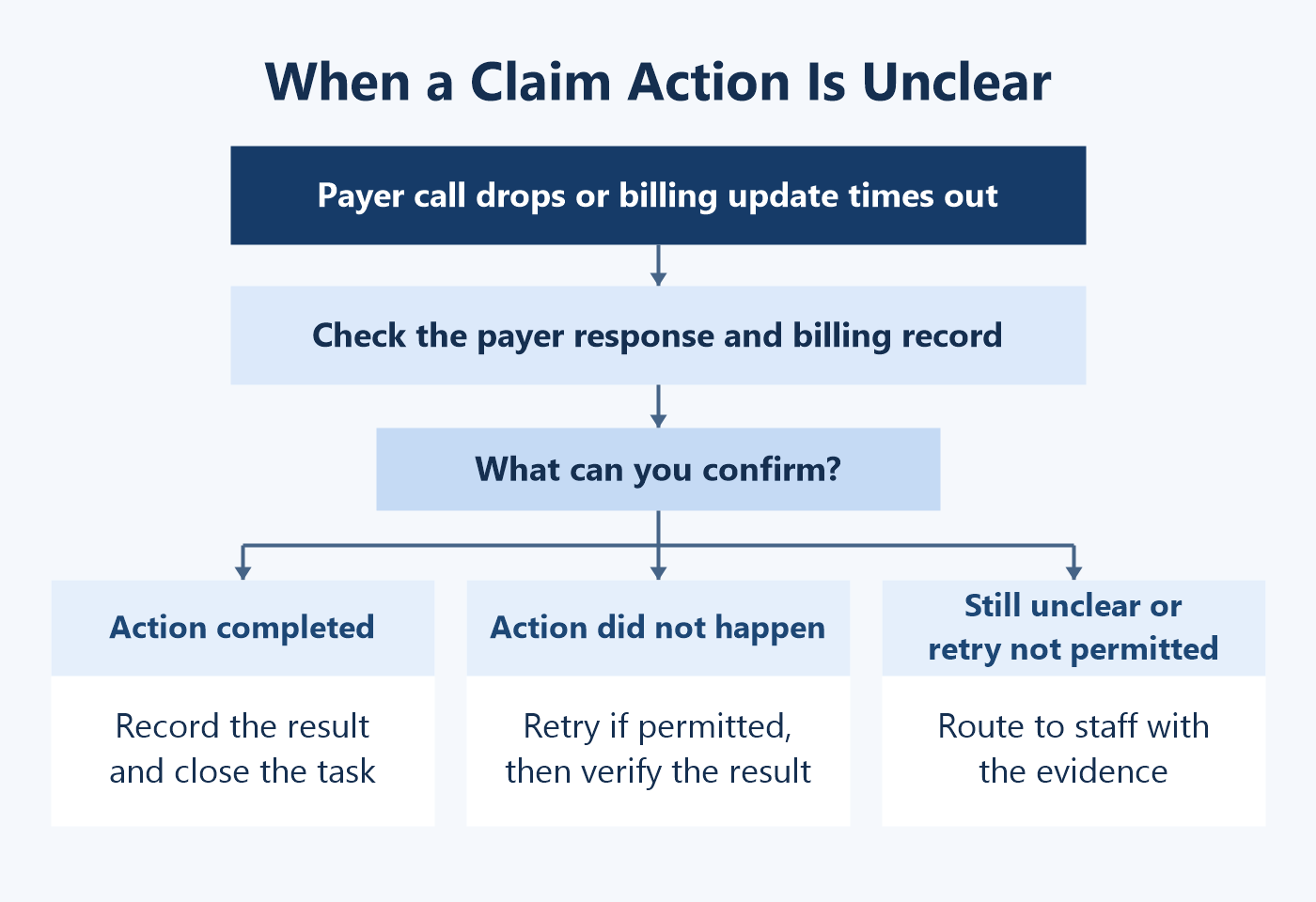
Sometimes the agent cannot tell whether an action worked. In that case, it should stop, keep the details it has and send the task for review. A timeout does not always mean the request failed, and a payer’s answer does not prove the billing system saved the update.
Tell the Difference Between a Dropped Call and an Unconfirmed Update
If a call drops before the payer gives a status, the team may need to call again later. But if the payer has already given an answer and the billing system has not confirmed the update, check the account first. Repeating the payer call may not solve the problem.
Check What Happened Before Trying Again
Before trying again, check whether the payer or billing system already processed the request. Use transaction IDs or duplicate checks where available to avoid sending the same request twice or making the same account change again.
Pass Along Enough Detail for Staff to Take Over
Give staff enough information to take over: claim details, what happened, any notes or call record, what is still unclear and what needs to happen next. Send the task to a named team or role and set a due date.
|
Situation |
What the agent or team should do |
Details staff need |
|---|---|---|
|
Call or portal times out |
Save the attempt details and check the claim before trying again |
Claim details, attempt time and last confirmed status |
|
Payer response is unclear |
Keep the payer’s exact words and mark the status as unclear |
Call notes or transcript, payer reference and question to resolve |
|
Payer asks for a document |
Create a task for the requested document |
Document name, where to send it and due date |
|
Billing system does not save the update |
Keep the payer response separate and send the account update for review |
Payer response, failed update and claim ID |
|
Duplicate activity may have occurred |
Stop and check the claim’s current status before taking another action |
Transaction reference and prior activity |
How Can RCM Teams Add Payers Without Disrupting Live Work?
Add payer coverage in stages. Payers may use different portals, phone menus, claim identifiers and status terms. For each new payer, document how the agent should connect, what it needs to check and how the result should appear in the billing system.
Record What Is Different About Each Payer
Record the connection path, required claim details, common response terms, reference-number format and next-step rules for each payer. Do not assume a workflow that works with one payer will work the same way with another.
Start With a Small Group of Payers
Start with a small group of payers and track how often claims fail to match, statuses remain unclear or staff need to step in. Add more payers once the team understands the issues and can confirm that account updates are being recorded correctly.
Update and Retest the Workflow When Payers Change
Payer portals and phone menus change, and document requirements can be updated. Assign someone to track those changes, update the workflow and test it before returning the change to wider use.
Give Staff a Way to Handle Payer Issues
Some payer interactions will still need staff help. Give those accounts a clear route to the right team, and make sure the team’s notes and outcome are added to the same claim record.
How Can an RCM Team Expand a Workflow That Already Works?
Once the workflow is stable, increase its volume and payer coverage before adding another RCM task. This helps the team see whether its systems, claim queues and support process can handle more work without changing too many things at once.
Handle More Claims Before Adding More Tasks
Review call and transaction capacity, queue size, system limits, retry volume, month-end demand and the time staff need to handle unresolved claims. Do not add more work than the operations team can review and support.
Add Payers in Stages
Use what the team learned from earlier payer releases to decide which group is ready next. Compare claim-match failures, unclear responses and staff handoffs with the results from the existing workflow.
Add a Related RCM Task Only When It Is Ready
A claim-status workflow may use the same claim details and payer connections as a documentation-request workflow. However, other healthcare RCM automation use cases, such as eligibility verification, prior authorization, claim preparation and denial management, involve different tasks. Each needs its own trigger, approved actions, completion check and assigned owner.
Do You Need More Than One Agent?
More claims do not automatically mean you need multiple agents. Keep one agent when it can handle the task within its approved limits. Use separate agents only when the work needs different tools, responsibilities or access.
A step-by-step expansion can help teams grow the workflow without changing too many things at once:
- Stabilize one workflowResolve recurring issues and verify that claim updates are recorded correctly.
- Increase claim volumeCheck queue capacity, confirmed updates, and staff workload as volume grows.
- Add payers in tested batchesReview claim-match failures, unclear responses, and staff handoffs for each batch.
- Add a related RCM taskChoose a related task. Define success and assign an owner for exceptions.
Which Metrics Show Whether an RCM Agent Is Working Reliably?
To know whether an RCM agent is working reliably, track whether it handled the right claim, whether the account was updated correctly and whether unresolved work reached the right person. Call volume and the number of agent actions do not show the whole picture.
|
Measure |
What to track |
Why it matters |
|---|---|---|
|
Claim-match failures |
Claims that cannot be confidently matched to an account |
Shows whether payer responses are being added to the right claim |
|
Confirmed update rate |
Allowed actions checked in the billing system |
Separates attempted actions from completed work |
|
Unclear outcome rate |
Payer or system results that could not be confirmed |
Shows where the workflow needs review |
|
Duplicate actions |
Repeated submissions, notes or account updates |
Highlights retry and duplicate-update risks |
|
Time in the exception queue |
How long an unresolved task waits for staff action |
Shows whether open claims are being handled |
|
Payer-specific issues |
Exceptions grouped by payer and response type |
Shows which payer setup needs attention |
|
Cost per completed task |
Operating cost divided by completed, checked claim tasks |
Connects operating cost to a real workflow result |
Compare Similar Claims and Payer Groups
Compare the same types of claims and payer groups before and after expansion. Take claim age, payer mix, transaction volume and staffing changes into account so you do not automatically credit every change to the agent.
Look at the Issues Behind the Averages
A stable average can hide a payer group with frequent mismatches or a growing queue of unresolved claims. Review why updates could not be confirmed, why work had to be repeated and when staff had to step in before increasing volume.
How Can Trigma Help Bring RCM Workflows Into Production?
Trigma’s AI healthcare RCM solution brings together pre-authorization preparation, patient and clinical information, billing review and payer follow-up. The right scope for a live deployment depends on the systems already in use, the work the agent will handle, the actions it is allowed to take and how the team will check results.
The AI healthcare RCM solution can help teams prepare authorization cases, bring clinical and patient information together for billing review, track claim status and send unresolved accounts to specialists.
An AI Voice Agent for Claims Follow-Up
Trigma’s AI voice agents for healthcare claims follow-up help a US healthcare RCM company manage payer follow-up. They navigate payer IVRs, speak with insurance representatives, place calls in batches, maintain transcripts and call records, manage retries and capture payer responses.
In this implementation, the workflow can handle 10× more RCM follow-up calls, though results will vary by payer, claim type and deployment.
Before taking a similar workflow live, agree which claims should enter the queue and which payers it will cover. Define what information the agent can use, which actions it may take and how the team will check each result. Make sure unresolved claims have a clear owner and next step.
BUILD WITH TRIGMA
Discuss Your RCM Workflow
Talk with Trigma about your payer workflows, existing systems and RCM priorities. A good starting point is one clearly defined task, a result the team can check and a named person or team to handle exceptions.
FAQs
What Is a Verified RCM Work Item?
It is one claim-related task that has been matched to the correct account, completed within the agent’s approved actions and checked against the payer or billing record.
Should an Agent Retry a Payer Call After a Timeout?
Not right away. First check whether the payer interaction or account update went through. Retry only after the team knows what happened.
How Should a Team Handle a Payer Portal Change?
Record the change, update the payer-specific settings, test the affected steps and release the change to a small group before rolling it out more widely.
What Happens When the Agent Cannot Match a Payer Response to a Claim?
It should keep the payer’s response, leave the claim unchanged and send the task to an RCM specialist with the account details and available evidence.
Does Scaling an RCM Agent Always Require Multiple Agents?
No. One agent may be enough for a clearly defined task. Multiple agents make sense when different tasks need separate responsibilities, tools or access.