performance icon
Top IT Services Company 2025 Top Software Developers 2025 Top Generative AI Company 2025 G2 High Performer Winter 2025 G2 Leader Winter 2025 AI Deployment Company 2024 Top Software Development Company in USA for 2024 Top ReactJs Company in USA for 2024
trigma-logo

From Idea to Launch: How Long Does It Take to Build a Mobile App?

The mobile app market is growing at a breakneck pace. The global mobile application market size was valued at USD 252.89 billion in 2023 and is projected to grow at a compound annual growth rate (CAGR) of 14.3% from 2024 to 2030. Businesses across the globe are investing in building customized mobile app solutions to stand out in the market.

Building a mobile app is an exciting journey, but one filled with many moving parts. From the first spark of an idea to when your app hits the app stores, each stage of development has its unique challenges, and timelines. One of the most common questions people ask when starting this journey is: How long does it take to build a mobile app?

The answer is not as simple as several days or months. Mobile Application development is a dynamic process that involves factors such as complexity, design, functionality, and market readiness. In this blog, we will discuss the time required for building various types of mobile apps and the factors influencing the app development timeline.

How Long Does Mobile App Development Take at Each Stage?

Developing a mobile app is a complex journey that involves many tasks, each with its own schedule. Knowing the length of each phase will help you set realistic expectations and plan accordingly for project milestones. Here is a breakdown of the time required for each stage of mobile app development:

Ideation And Planning

The ideation and planning stage is essential for setting up the app’s foundation. During this time, stakeholders and development teams work together to define the app’s goals and objectives. This phase usually takes between 1 to 2 weeks, depending on how complex the app is and how clear the initial ideas are. You must search for a unique mobile app idea that could help your business generate a good amount of revenue. You can read our other blog about Biggest Money Making App Ideas to get a fantastic app idea.

Design and Prototyping

Design and prototyping focus on visualizing the app’s appearance and user experience. Wireframes map out the app’s structure, while UI/UX design involves crafting detailed elements and ensuring usability. During prototyping, stakeholders can interact with a basic version of the app before development starts. This stage typically takes 3 to 4 weeks, depending on the design’s complexity.

App Development

The development phase is the most time-intensive, usually taking 3 to 6 months. The duration varies based on the app’s complexity, feature set, and whether it's being built for iOS, Android, or both. This stage covers coding, service integration, and crafting the app's core functionalities. This phase usually takes 1-2 months to complete. Have a look at our blog on Top 10 Mobile App Development Frameworks in 2024 and make your app development a great success.

Testing and Quality Assurance

Testing is essential for making sure the app is reliable, performs well, and offers a great user experience. This phase includes several rounds of testing to spot and fix bugs. It generally takes 4 to 6 weeks, but the timeline can vary depending on the app's complexity and the number of issues found.

Launch and Deployment

The launch and deployment stage is about getting the app ready for release, which includes submitting it to app stores and ensuring it meets their guidelines. This phase typically takes 1 to 2 weeks, depending on app store review times and the availability of marketing materials.

Factors Influencing App Development Timeline

Are you thinking about launching a mobile app for your business but unsure how long the development process will take? The timeline for mobile app development depends on several key factors. Here are some of the most important ones to consider:

Complexity of the app

Program complexity is one of the main factors that determine development time. Applications can range from simple single-purpose applications to very complex platforms with multiple inputs and capabilities.

Basic App

Simple applications, such as to-do lists, calculators, or basic information platforms, are created quickly. They include key features, a simple user interface, and back-end integration. In most cases, these projects can be developed in 3-4 months.

Mid Level Apps

Apps with moderate complexity, such as e-commerce platforms, social networking apps, or apps that require user authentication, payment gateways, or third-party API integration, take longer to develop. Development timelines for such apps usually range between 6-9 months.

Complex Apps

The most complex applications, such as on-demand services (Uber, DoorDash), enterprise-level solutions, or applications that require advanced functions such as artificial intelligence, machine learning, and real-time data processing or it may take a long time. Depending on the level of customization and complexity, complex applications can take 9-12 months or more to develop.

Platform Choice: iOS vs. Android vs. Cross-Platform

Whether you develop for iOS, Android, or both affects the schedule. Applications for iOS and Android are developed using various programming languages ​​and development frameworks. If you focus on two platforms, you may want to create two separate apps (native development) or opt for cross-platform development using frameworks like React Native or Flutter.

Native iOS or Android Development

Creating separate apps for iOS and Android takes more time because each platform has different development and testing processes. It has its period, which varies from 2 to 6 months depending on the difficulty. Have a glance at the blog 6 Ultimate Steps for Developing a Profitable iOS App with Trigma if you are planning to launch an IOS mobile app for your business.

Cross-Platform Development

Cross-platform tools allow developers to write and deploy the same code to both platforms. Although this can save time, adjusting the functions according to the original application conditions will take longer. You can make use of Flutter for Cross-platform App Development in order to get the best results.

Design and User Experience (UX)

User interface (UI) design and user experience (UX) are critical to the success of any mobile app. A well-designed app not only looks good but also provides a good user experience, which increases the chances of success in the market. However, creating a user interface and UX can be time-consuming.

Custom Designs

If you choose a highly customized design with animations, complex user flows, or detailed interactions, the design phase will take more time. Each screen, interaction, and transition must be carefully planned, designed, and tested, adding weeks or months to the schedule.

Template-Based Designs

On the other hand, using pre-made models or standard design models can reduce the design part. These models are faster to implement, but may not offer the same level of customization.

Third-Party Integrations

Many apps rely on third-party services for important functions, such as payment gateways, social media sharing, push notifications, geolocation services, or analytics tools. Integrating these services can add time to the development process, especially when the APIs are complex and require little documentation.

Simple Integrations

Some third-party integrations are easy to set up and have well-documented APIs that allow developers to quickly integrate into the app.

Complex Integrations

Some apps may require tuning or debugging, especially if they need to be adapted to specific application needs. Joining older or less documented services can add weeks to the list.

Testing and Quality Assurance (QA)

The testing phase is essential to ensure that the app works as intended and provides a flawless experience to the users. Testing involves checking the app on different devices, operating systems, and features to identify and fix any issues.

Automated testing

Developers can use automated testing tools to quickly run multiple tests in an application. While testing may speed up the process, it may not fix all bugs or performance issues.

Manual Testing

Hands-on testing, where testers have the opportunity to physically use the app on different devices and scenarios, takes longer but also captures issues. automatic devices may be lost. Depending on the complexity of the application, the test can take anywhere from a few days to a few weeks.

Effective Strategies to speed up your mobile app development process

Mobile app development can be time-consuming, but there are ways to speed up the process without sacrificing quality. Strategies like using cross-platform tools, starting with a minimum viable product (MVP), leveraging pre-built templates, and maintaining clear communication with your team can streamline development. Prioritizing essential features and testing early can also help launch your app faster in the competitive market.

Minimum Viable Product

Start with an MVP ( Minimum Viable Product)

To speed up mobile app development, focus on creating a Minimum Viable Product (MVP) with only the essential features. This allows you to launch quickly, test the app in real-time, and gather user feedback for improvements—saving time on unnecessary extras while still delivering value.

Maintain Clear Communication

Maintain Clear Communication and Collaboration

Efficient communication between developers, designers, and stakeholders is key to avoiding delays. Regular check-ins, clear documentation, and tools like Jira or Trello keep everyone aligned. Open, ongoing communication helps prevent reworks and last-minute changes, ensuring smoother, faster progress.

Automate Testing

Automate Testing and Continuous Integration

Automated testing and continuous integration (CI) tools, like Jenkins or Travis CI, speed up development by catching bugs early. They automatically test new code, reducing manual testing and ensuring issues are fixed faster, keeping the process smooth and efficient.

Utilize Cross-Platform

Utilize Cross-Platform Development Frameworks

Cross-platform frameworks like Flutter, React Native, and Xamarin let developers code once and deploy on both iOS and Android, slashing development time. While they might not match native app performance, they’re great for speeding up the process while still delivering a solid user experience.

speed up app development,

Opt For Shorter Release Cycles

To speed up app development, we use shorter release cycles, delivering new features for feedback as soon as they’re ready. This approach lets us quickly adapt to market changes and customer needs, accelerating deployment and keeping the project on track.

Summing Up

Building a mobile app can take anywhere from a few months to over a year, depending on how complex it is and the features you need. Key stages include planning, design, development, testing, and launching the app. To speed things up, focus on creating a basic version (MVP), use cross-platform tools, rely on pre-built templates, and automate testing. Clear communication with your team is also crucial. By keeping these strategies in mind, and choosing a renowned and expert - mobile app development company like Trigma you can develop your app faster and ensure a smooth, successful launch.

Ready to turn your app idea into reality? Let our expert team build a high-performance app that stands out and drives success. Start building the future with us today!
The best 5 AI Image Generators Software to try in 2024

Remember the old days when taking photos was an uphill task requiring the use of complicated software? In this era of cutting-edge innovation and technology, it is all possible within seconds. Many AI tools have emerged, enabling content creation, branding, marketing, and more.

In this fast-paced technological landscape, the global AI image generator market size is expected to grow to USD 917,448 thousand by 2030, with a CAGR of 17.4%.

north-america-customer-relationship-management

The data shows that many AI image generator software options are evolving in the market, and it is time to choose the best one.

In this blog, we will delve deeper into this discussion to find the best AI image generator software and explain how it works.

Know about AI Image Generator

Before we discuss the best image generators, let's first understand what an AI image generator is.

An AI image generator is a tool that uses artificial intelligence to create images from scratch or modify existing ones. This involves algorithms that interpret input data to produce visual graphic images. These images can be in the form of 2D, 3D, cinematic, or other formats as desired. It is a growing technology that is revolutionizing the IT market with its amazing innovations.

Applications of AI Image Generators in Various Fields

  • Marketing
  • Digital Art
  • Design
  • Robotics
  • Entertainment
  • Medical Imaging

Working of AI Image Generator

Are you wondering how high-resolution images are created and designed by AI? This section explains how developers generate high-quality AI images.

AI image generators use algorithms, particularly Generative AI models like Generative Adversarial Networks (GANs) and Variational Autoencoders (VAEs). These algorithms analyze vast amounts of data to learn the patterns and features that exist in images.

Generative Adversarial Networks (GANs)

GANs help generate realistic content through the use of two networks:

  • Generator: Creates new images and content.
  • Discriminator: Checks and verifies whether the generated images are real or fake.

The generator and discriminator work together to produce increasingly realistic images over time.

Variational Autoencoders (VAEs)

VAEs are typically used for the latent representation of data. They work as follows:

  • Encoder: Converts input data into a vector where each dimension represents a learned attribute of the data.
  • Decoder: Automatically takes the encoded values and creates subsequent results for the data.

Deep Reinforcement Learning

Deep reinforcement learning algorithms achieve specific goals by using sequences in the data. These algorithms are primarily applied in fields like gaming and robotics.

Through repetitive training, AI image generators produce increasingly realistic and high-quality images.

Best 5 AI Image Generator

Heading into the Discussion: The Best AI Image Generators for High-Quality Images

Now, let's discuss the best AI image generators that you can use to create high-quality images.

1. DALL-E 3

DALL-E 3 is an image generation model developed by OpenAI. First launched in 2021, its latest release is the third iteration. The model generates images based on the input provided, leading to the creation of high-quality images as per the given commands and inputs.

  • Fun Fact: The first version of DALL-E created a "snail made of harp strings" based on a simple text prompt!
Features Pros Cons
Integration with Chatgpt Faster processing Privacy concerns
Better context understanding Chatgpt integration Higher cost
Available to the public for free User-oriented Require technical knowledge
Improved customized options
  • Pricing: Chatgpt plus subscription, $20 per month

2. Stable Diffusion

Stable Diffusion is a generative AI model that produces unique photorealistic images from provided input. Launched in 2022, it offers new features, including video and animations. This model is based on diffusion technology, which significantly reduces the processing requirements for images, allowing the software to run effectively on a laptop or mobile phone with a good GPU (Graphics Processing Unit).

Stable Diffusion is in high demand because it is easy to use and accessible. For the first time, anyone can download the model and generate images. It is user-friendly, and users don’t need any additional information to generate output images.

Features Pros Cons
Text-to-image generation High-resolution output High cost
Image editing Interactive user interface Resource intensive
Interactive user interface Batch processing Ethical and legal concerns
API accessibility API Access Accessibility issues

3. MidJourney

MidJourney is another widely used generative AI-based model that creates images from text using specified prompts.

You might be wondering if every software creates images from input, what makes each unique. They differ based on their characteristics. MidJourney stands out due to its adaptive features, which can be mixed and matched to create new styles.

Features Pros Cons
Artistic styles High-quality images High cost
Customization options User-friendly interface Legal and ethical considerations
Text to image generation Advanced customization options Dependence on input
Adaptive feature Versatility in design

4. NightCafe Studio

NightCafe Studio is a software that allows artists to create artistic images and convert their photographs into digital art. It is widely used by artists, designers, and enthusiasts to create visually appealing images from text prompts.

Features Pros Cons
Text to image generator High-quality output Highly resource intensive
Neutral style transfer User-friendly interface Cost of advanced features
Batch processing Support batch processing High dependence on input
Inbuilt community Versatile in nature Limited real effects
  • Fun Fact: NightCafe Studio can turn any photo into a masterpiece in the style of famous artists like Van Gogh or Monet.

5. Artbreeder

Artbreeder, also known as Ganbreeder, is a collaborative platform that allows users to create and modify images by blending different artworks. It uses Generative Adversarial Networks (GANs) to enable users to combine features from various images and create entirely new graphics.

Features Pros Cons
Image blending Creative artistic design formation Cost
Use of generative models Versatility in designs Resource intensive
High-quality output User-oriented Ethical considerations
Categories diversification High-resolution images Quality control challenge

What is the best AI image generator?

Basis DALLE-3 Stable diffusion Midjourney Night cafe studio Artbreeder
Primary role Text-to-image generation High-resolution images Artistic style images Neural network image transformation Image blending and evolution
Community features Limited Strong community collaboration Community-oriented platform Collaboration, batch processing Community driven platform
Customization Limited Extensive Versatile, user-friendly Style and parameter adjustment Extensive parameter adjustment
Cost Higher cost due to advanced features Higher cost due to professional usage Moderate Varies, premium features available Varies, premium features available
Output quality High-quality images High detailed oriented Artistic styled High-quality diverse styles High quality versatile designs

Let’s Take Another Step In Your Tech Journey

After exploring the leading generative AI tools, you're probably eager to harness innovative software for your business. At Trigma, our team of experts is ready to help you make that leap. As a top-tier provider of generative AI development services, we're here to elevate your business to new heights. Let's collaborate and drive your success forward.

7 Features That Your E-learning Web App Must Have

The rise of technological advancements have been a game changer for the mobile industry. Mobile app development has reached a point where apps are used in the sphere of communication and gamification and the education sector. According to a survey, education apps are the third most in-demand category on the App Store, accounting for 9.79% of active e-learning apps on iOS.

E-learning app development is full of market growth opportunities, driven by amazing innovations. These apps have transformed traditional education by shifting learning to mobile platforms. With the advent of e-learning platforms, the education sector has undergone a huge disruption and created a buzz in the market.

According to CMI (Customer Market Insights), the global e-learning market size is estimated to reach $848.1 billion by 2030, growing at a CAGR of 17.53% by 2033.

In this blog, we’ll discuss the benefits, features, costs, and increasing demand for e-learning apps to understand the potential of e-learning web apps in education.

Features that E-learning apps should have

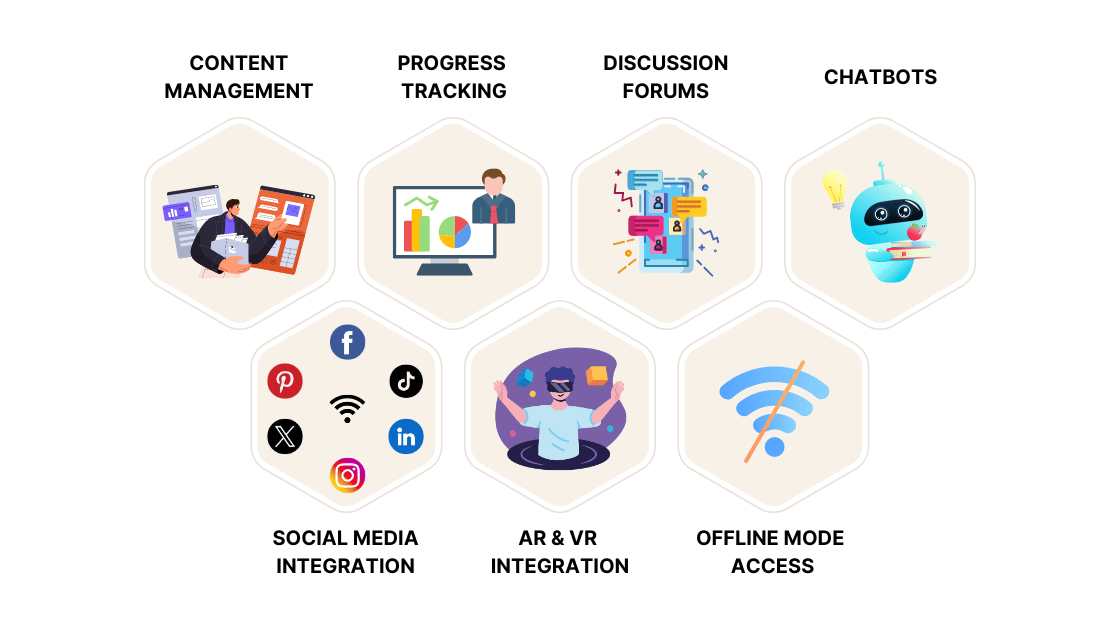
When developing e-learning apps such as VR School-Based History Museum Web App or other apps incorporating specific features can greatly enhance your web app's performance. Here are 7 important features you should include in your web app:

E-learning apps features

1. Content Management

Content management is the unique selling point of any e-learning app. In today’s market, many e-learning apps are loaded with complex information, which can make it difficult for students to grasp the context. Properly managed content can significantly enhance user experience and attract learners to your app for their learning needs.

2. Progress Tracking

People love to see the fruits of their efforts. A tracking feature is beneficial for both students and instructors as it helps them monitor performance and make necessary improvements. Including this feature in your web app can attract a lot of traffic to your platform.

3. Discussion Forums

Discussion forums provide a platform for students to engage in meaningful conversations, ask questions, and share insights from their learning experiences. These forums are valuable for engaging your audience and addressing their issues and challenges. Adding this feature to your web app encourages active participation and community building.

4. Chatbots

Integrating real-time chat functionality enables smooth communication and collaboration with learners. It allows users to clarify doubts instantly and fosters a sense of connectivity and engagement. Many successful companies use chatbot features to enhance customer engagement.

5. Social Media Integration

Social media has become a central point of interaction, where people seek validation and share their achievements. Integrating e-learning platforms with social media enables users to share their learning milestones and leverage their social networks for knowledge and learning.

6. AR and VR Integration

AR and VR are emerging technologies that offer new opportunities in education. Integrating e-learning platforms with these technologies provides students with immersive learning experiences using 3D models and practical applications. Including AR and VR in your e-learning web app enhances learning engagement and effectiveness.

7. Offline Mode Access

Access to a reliable internet connection can be a concern in various regions. To overcome this barrier, your app should feature offline connectivity, allowing students to access study materials without an internet connection.

Why is there a high demand for E-learning web apps?

E-learning's extensive use cases have revolutionized the entire education industry and created a buzz in the market. Here are the reasons for its higher demand:

1. Accessibility Potential

E-learning web apps allow users to access content from anywhere in the world at any time. They provide ease of access to students in their learning process. Students can learn at their own pace, which is especially helpful for those who work or have other responsibilities.

2. User-Oriented Content

Modern e-learning platforms incorporate elements such as images, videos, and interactive quiz sessions, which help students learn in an engaging environment. Evolving AI technologies provide students with a personalized learning experience, adapting content to meet each user's unique needs.

3. Lifelong Learning and Skill Enhancement

With the advent of a lifelong learning culture, e-learning web apps cater to these needs by offering various courses on different subjects. The fast-paced evolution of technology has created a skills gap that the traditional system cannot fill quickly. E-learning provides an edge by enhancing skill development and learning.

4. Cost Efficiency

E-learning eliminates various costs involved in traditional systems, such as infrastructure and housing. Educational institutions and companies can reach a wider audience without incurring excessive costs, making it an economically viable option.

How much does an E-Learning platform cost?

The implementation costs of e-learning platforms depend on various factors, including features, design, complexity, and technology stack. Different platforms incur different costs based on their usage and development. Here are the common ranges for these platforms:

Type Of App Cost
Basic E-learning Platform $15,000 - $50,000
Mid-Range E-learning Platform $50,000 - $150,000
Advanced E-learning Platform $150,000 - $500,000

E-learning platform with Trigma

With over 15 years of experience in Web App Development Services, we offer the best solutions tailored according to user needs. We help you craft a personalized solution and offer the best service according to your needs.

Build a Law Firm CRM like Clio: Features, Costs, & Benefits

In the legal industry, long-lasting client relationships are crucial for success. A well-designed CRM (Customer Relationship Management) system can be the backbone of a law firm’s client interactions and operational efficiency. With over 78% of law firms utilizing CRM software, it’s clear that these tools are vital for managing client information, case histories, and billing processes effectively.

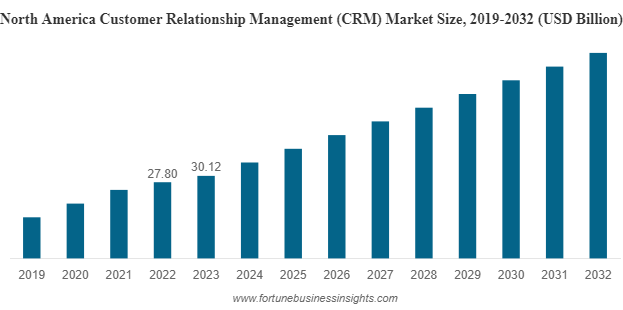
The global CRM market, valued at USD 91.43 billion in 2023, is set to expand to USD 101.41 billion in 2024 and reach USD 262.74 billion by 2032, with a compound annual growth rate (CAGR) of 12.6%. This growth underscores the increasing importance of CRM systems across various sectors, including legal services.

In this blog, we will delve into how to create a CRM system like Clio.

north-america-customer-relationship-management

What is a CRM software?

CRM is a digital tool that helps businesses manage and improve interactions with current and potential customers. It provides a centralized platform that organizes all customer activities in one place.

This tool includes storing detailed information about customers, such as contact history and communication details. It is used effectively to track and analyze data about each client, offering a personalized experience.

CRM software helps businesses enhance customer satisfaction and build strong, effective relationships. The AI Integration with CRM has transformed the future of the tech industry in many ways and has enhanced the functioning of the software to a great extent.

Characteristics of a Good CRM

A robust CRM system integrates various functionalities to offer excellent customer service. Key features of a good CRM include:

  • User-Friendly Interface: An intuitive and easy-to-navigate interface allows users to access and manage information efficiently without extensive training.
  • Comprehensive Data Management: The CRM should manage all user data, including contact details, preferences, and documents, with an organized dashboard for easy access.
  • Client Communication Tracking: Effective CRM software records all client interactions—emails, phone calls, and meetings—ensuring that no communication is overlooked.
  • Client Portal: A client portal provides clients with access to case updates, documents, and communication channels, enhancing engagement and satisfaction.
  • Enhanced Security: Ensuring the security of client documents and data is crucial. Choosing the right technology stack is essential for safeguarding sensitive information.

Key Features Your Legal CRM Should Have

For a CRM tailored to legal firms, consider the following essential features:

  • Case Management System: Centralize case-related information, including histories, client details, and progress updates. This feature improves management efficiency and reduces the risk of errors by ensuring that all case information is well-organized and accessible.
  • Document Automation and Management: Efficiently manage a large volume of documents with features for creating, storing, and retrieving them as needed. A centralized system allows real-time access to important documents, saving time and reducing errors.
  • Application Accessibility: Ensure the CRM is accessible on mobile devices, allowing users to view case details, manage tasks, and communicate with clients from anywhere.
  • Client Intake and Management: Streamline client onboarding with features for online form generation, appointment scheduling, and document receipt. This automates data management and provides easy access to client information.
  • Reporting and Analytics: Utilize reporting and analytics tools to generate real-time insights into firm operations and client interactions. These tools help understand data trends and make informed decisions, aiding in lead generation and client targeting.

What’s The Ideal Cost For A Legal CRM?

The cost of developing a Legal CRM can vary based on the scope and features. Here’s the estimate:

Type of CRM Description Cost
Basic Legal CRM This CRM has basic features and is designed using simple tech-stack $30,000 to $70,000
Mid-Range Legal CRM This CRM had advanced-level features and a mid-level tech stack. $100,000 to $200,000
High-End Legal CRM This high-end comprehensive CRM has user-friendly features $200,000 to $500,000

Summing Up

The right choice of Legal CRM depends on your specific needs and expectations. This software can be a significant asset for the legal industry, automating various aspects of legal operations. The choice of CRM should align with your organization’s size and budget.

If you need assistance in building an effective CRM for your legal business, consider reaching out to Trigma. As a leading IT and Advanced AI/ML Development Service provider, Trigma specializes in providing customizable solutions tailored to our clients' needs. We can help you design and develop software that enhances productivity and delivers outstanding results.

The AI and Cloud Revolution: Why It’s Essential for Your Business

In recent years, AI and cloud computing have experienced tremendous growth, sparking a revolution in the tech world. Organizations across various industries are striving to harness these technologies to elevate their operations and achieve new heights.

According to a KBV research report, the Cloud AI market is projected to reach $395.8 billion by 2029, growing at a CAGR of 38.4%.

The integration of AI and cloud computing is not just a passing trend but a transformative force that can redefine how businesses operate and thrive in today’s dynamic market.

In this blog, we will explore the intense impact of this technological synergy and how it can drive success for businesses of all sizes.

Know About AI and Cloud Computing

Before diving deeper, it’s essential to understand the basics of AI and cloud computing in today’s rapidly evolving market.

Artificial Intelligence (AI):

AI is a branch of computer science focused on developing systems capable of performing tasks that typically require human intelligence. This includes understanding patterns, executing algorithms, and solving complex problems with innovative solutions.

Key Components of AI:

  • Natural Language Processing (NLP): Enables systems to understand and respond to human language.
  • Machine Learning (ML): Allows systems to learn from data and improve their performance over time without being functioned on exact programming.
  • Deep Learning: A subset of ML that uses neural network pathways to analyze various forms of data, such as images and text.
  • Robotics: Involves creating robots capable of performing tasks autonomously or semi-autonomously.
  • Computer Vision: Enables systems to interpret and understand visual information from the world, such as recognizing faces or objects in images.

These days AI is being integrated with CRM in order to provide users with a more personalized experience. Read out our blog: AI Integration with CRM: The Future of Tech to understand this in a better manner.

Cloud Computing:

Cloud computing delivers computing resources over the internet, commonly referred to as "the cloud." This model provides access to resources like storage, servers, databases, and software without the need to maintain physical hardware or infrastructure.

Key Models of Cloud Computing:

  • Software as a Service (SaaS): Offers software applications over the internet, eliminating the need for local installation and maintenance
    Examples: Salesforce, Microsoft Office 365, Google Workspace.
  • Platform as a Service (PaaS): Provides a platform allowing developers to build, deploy, and manage applications.
    Examples: Google App Engine, Microsoft Azure App Services.
  • Infrastructure as a Service (IaaS): Delivers virtualized computing resources over the internet, including servers, storage, and networking.
    Examples: Web Services (AWS) EC2, Microsoft Azure Virtual Machines, Google Compute Engine..

Also, read our blog: What is the Future of AI in Mobile App Development? And check out the bright future of AI in mobile apps.

Integration of AI and Cloud Computing in the Tech world

Integrating AI technologies into cloud systems enables businesses to automate complex processes, analyze vast amounts of data, and extract valuable insights. This relationship creates a powerful synergy that drives innovation and growth within an organization. Here’s a concise overview of how these technologies seamlessly integrate:

Inbuilt Infrastructure for AI

Cloud computing provides the necessary infrastructure to scale AI solutions efficiently. It offers customizable resources that can be adjusted based on the specific needs of AI models, which require significant computational power and storage. Cloud-based systems offer greater flexibility, allowing businesses to modify their hardware as needed.

Cost-Effective

Cloud services operate on a pay-as-you-go model, meaning businesses only pay for the resources they use. This approach helps in reducing costs and eliminates the need for heavy upfront investments in infrastructure.

Continuous Improvement

As AI technology evolves, cloud-based platforms provide regular updates and improvements to keep pace with the latest advancements. This ensures that businesses can always access the most current and effective AI tools.

Global Accessibility and Integration

Cloud computing allows organizations to leverage AI systems from anywhere in the world, facilitating global collaboration. It simplifies the implementation and use of AI solutions across various platforms, making it easier for businesses to integrate AI into their operations.

How This Integration is Empowering Businesses

The combination of AI and cloud computing is revolutionizing the way businesses operate and compete in the market. As market demands evolve with new innovations and trends, this integration is becoming essential for businesses of all sizes. Here’s how this technology is empowering organizations:

Data-Driven Decision-Making

Data-Driven Decision-Making

AI algorithms analyze vast amounts of data stored in cloud systems, enabling businesses to make informed decisions quickly. Whether it’s predicting customer behavior, identifying market trends, or optimizing operations, AI enhances decision-making. Additionally, AI improves personalized customer experiences by analyzing browsing history, purchase behavior, and preferences.

Fostering Innovation

Fostering Innovation

Cloud systems provide the computational storage and power needed for businesses to experiment with advanced AI algorithms. This fosters innovation, allowing companies to develop new products, improve services, and maintain a competitive edge in the market.

Rapid Prototyping and Development

Rapid Prototyping and Development

The flexibility of cloud systems allows businesses to quickly prototype, test, and refine products. This capability supports continuous improvement and enables the development of advanced versions, giving companies the agility to seize new market opportunities.

Streamlining Operations

Streamlining Operations

By hosting AI-powered automation on cloud platforms, businesses can automate repetitive tasks such as customer service, data entry, and inventory management. This reduces human error and allows employees to focus on more innovative and productive activities.

Final Thoughts

In summary, AI and cloud computing are not just emerging trends; they are transformative technologies reshaping how businesses operate and compete in the market. Integrating these technologies is no longer optional but essential for staying ahead in today’s competitive landscape. This powerful combination empowers businesses to thrive and grow.

At Trigma, we understand the challenges and opportunities that come with adopting these technologies. Our expertise lies in providing tailored Generative AI Development Services and cloud solutions that meet your specific business needs. Whether you aim to leverage technology to optimize your operations or innovate new ideas with effective execution, Trigma is here to support you with unique, customized solutions.

Unlock the full potential of your business with advanced artificial intelligence and cloud computing solutions. Transform your operations, drive innovation, and stay ahead of the competition. Partner with us to harness the power of AI and cloud computing. Contact us today to start your digital transformation journey!